How Businesses Can Use AI Beyond ChatGPT in 2026
 Justin Canetti7 min read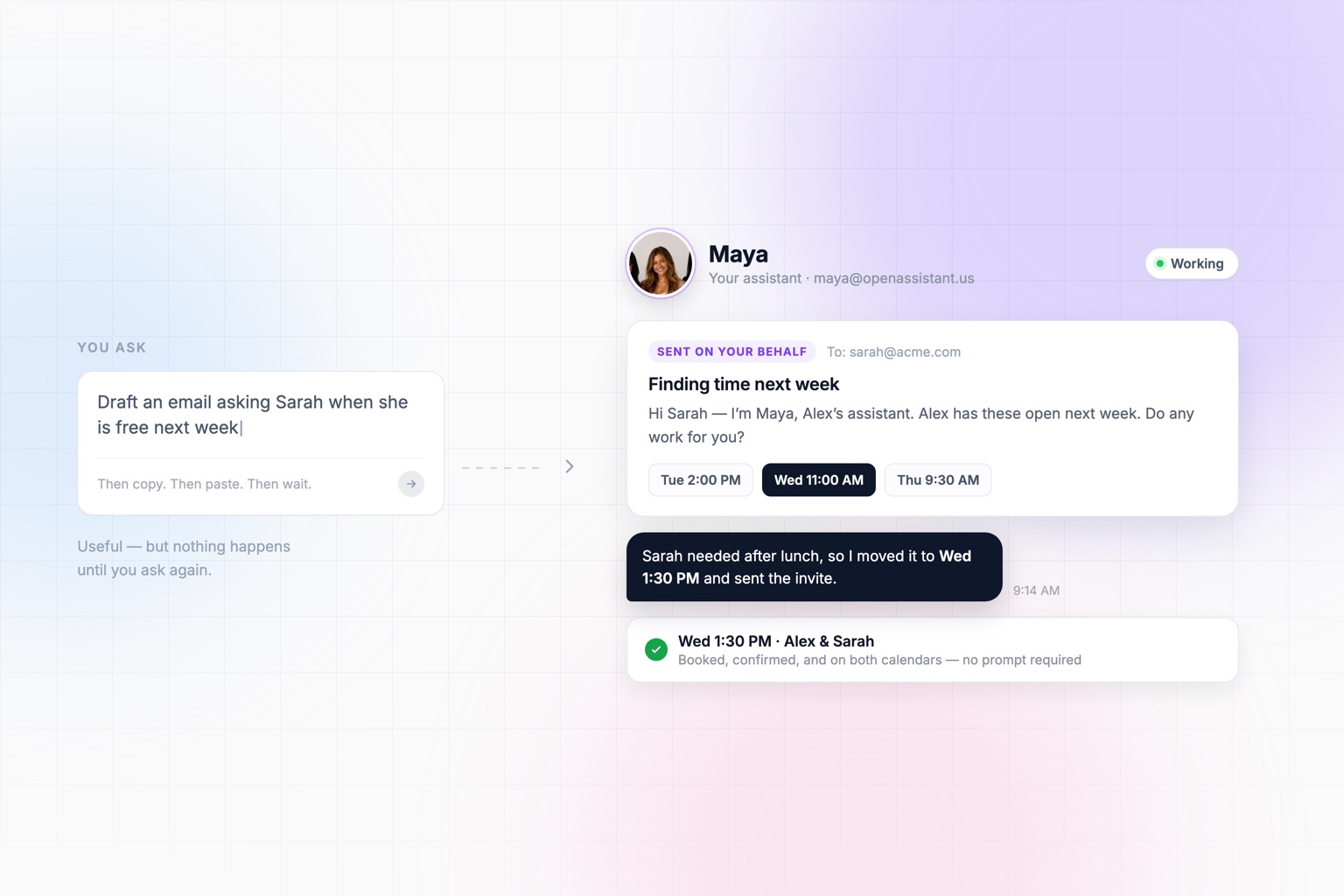
ChatGPT changed the way millions of people work.
Need to write an email? Ask ChatGPT. Research a company? Ask ChatGPT. Summarize a document, brainstorm an idea, analyze some data, or draft a presentation? AI can help with all of it.
But there's still a problem: you have to ask.
Most of the time, you open a chat window, explain what you want, wait for it to finish, take the output, and then go do something with it. That's incredibly useful. It just isn't how we work with human assistants.
You don't sit next to your assistant all day handing them one prompt at a time. You give them responsibilities. They learn how you work, talk to other people, use the same tools you use, and get things done whether you're actively talking to them or not.
A few years into the chat era, that's where business AI is heading next.
From AI You Use to AI That Works for You
The next generation of AI tools isn't just about generating better answers. It's about doing the work.
That means giving AI access to the tools and context it needs to complete a task, communicate with people, and start work on its own when something happens.
To be fair, chat products are moving in this direction too. Connectors, memory, and scheduled tasks all point the same way. So the distinction that matters isn't which model is underneath. It's whether the assistant lives where your work already happens, whether it can talk to other people, and whether it can begin without you.
Here's what that looks like in practice.
1. AI That Communicates Where You Already Work
One of the limitations of traditional AI tools is that they're another destination. You open an app, start a conversation, explain what you need, and wait for the response.
An AI assistant can work differently. Your OpenAssistant has its own name, face, and personality, along with its own email address and phone number. So you can email it. You can text it. You can message it from the tools your team already uses.
Need something while you're away from your computer? Text your assistant. Want it to handle something from an email thread? Add it to the conversation, the same way you'd cc a coworker.
The identity matters more than it sounds. You're not typing into a blank box, you're messaging Maya. Working with AI starts to feel less like operating software and more like working with another person on your team, and the assistant doesn't need to live in another tab.
2. AI That Communicates With Other People for You
This is where AI assistants start becoming much more interesting. An assistant shouldn't only communicate with you. It should be able to communicate for you.
Take scheduling. You could ask an AI tool:
What times am I free to meet Sarah next week?
That's helpful. But what you actually want is:
Find a time with Sarah next week.
So your assistant emails Sarah directly, from its own address:
Hi Sarah — I'm Maya, Alex's assistant. Alex would like to find time with you next week and has Tuesday at 2pm, Wednesday at 11am, or Thursday at 9:30am open. Do any of those work for you?
Sarah replies that Wednesday is better but she needs it after lunch. The assistant checks the calendar again, offers 1:30pm, gets a yes, and sends the invite.
And if Sarah never replies, the assistant follows up on its own — which is the part that usually falls through the cracks.
From Sarah's side, this reads like an email from someone on your team, because that is effectively what it is. She doesn't have to learn a tool, click a booking link, or adapt to anything.
You gave it the outcome. It handled the coordination, including the messy parts.
The same idea extends far beyond scheduling: following up with someone, gathering information from coworkers, sending reminders, coordinating a project, or getting an answer from someone without making you the intermediary.
That's work you're no longer doing.
3. AI That Works Without Waiting for You
This may be the biggest change of all. Most AI today is reactive: you ask, AI works, AI responds.
But a lot of business work doesn't begin because someone typed a prompt. It begins because something happened.
A meeting is about to start. It's Monday morning. A deadline is approaching. A customer hasn't responded. A new lead came in. A report is due.
An AI assistant can treat those events as triggers and start working without waiting for you to ask. For example:
- 30 minutes before every meeting, research the attendees and send me a briefing.
- Every Monday morning, prepare a summary of what happened last week.
- Before a sales call, research the company and suggest talking points.
- Every Friday, identify anything I promised to follow up on but haven't.
- When a deadline is approaching, remind the people responsible.
- Every morning, send me my schedule and anything I should know about the day ahead.
You define what you want once. Then it keeps happening.
4. AI That Knows the Context of Your Work
The best assistant isn't starting from zero every time you ask a question. It knows what's happening.
Your calendar holds one piece of the picture. Your inbox holds another. Your files, meeting notes, company systems, and conversations hold the rest.
Connecting AI to those systems means you stop re-supplying context you've already given. Instead of saying:
Here are my notes from my last meeting with Acme. Here's the email thread. Here's their website. Can you help me prepare for tomorrow's call?
You can say:
Prep me for my meeting with Acme tomorrow.
Or better yet, you say nothing at all, because your assistant already knows about the meeting and the briefing is waiting for you.
5. AI You Can Hand a Standing Responsibility To
Every business has hundreds of small jobs that someone has to remember to do. Check this every Monday. Send this before every meeting. Follow up after this happens. Compile this report at the end of every month. Remind everyone about this deadline.
None of these tasks is difficult. The problem is that someone has to remember them — and that someone is usually expensive.
Traditional automation can handle parts of this, but it asks you to spell out a rigid sequence of steps and it breaks the moment reality doesn't match the diagram. An assistant is different. You describe the responsibility in plain English, and it handles the judgment calls inside it: who to chase, what counts as done, when something is unusual enough to bring to you.
That last part matters. A good assistant doesn't just execute quietly — it reports back, flags what it couldn't resolve, and tells you when something changed.
That's a very different relationship with AI than a chat window.
You Decide How Much Autonomy It Has
Handing work to an assistant raises a fair question: what is it allowed to do without asking me first?
That's a setting, not a guess. OpenAssistant runs anywhere along the spectrum:
- Fully autonomous. It emails people, coordinates, and completes work on its own, then tells you what it did.
- Manual approval on everything. Nothing leaves your account until you've read it and said yes.
- Anywhere in between. Let it book internal meetings freely but hold outbound emails to clients for your review. Let the Monday summary run itself but approve anything that goes to a prospect.
Most people start cautious and loosen the dial as they see how the assistant handles real work. The point is that the dial is yours, and it can sit in a different place for different kinds of work.
You can read more about how we think about control on our mission page.
What This Looks Like on a Team
Individually, this saves you a few hours a week. Across a team, the math changes.
Every person has their own version of the same recurring work: meeting prep, follow-ups, status updates, scheduling, weekly summaries. When each person has an assistant handling their own version of it, you're not eliminating one job — you're removing a layer of coordination overhead from everyone at once.
That's also where standards start to matter: shared workflows, consistent formats, and one place to see what assistants are doing across the company.
What Comes After ChatGPT?
ChatGPT made AI accessible by giving everyone an incredibly powerful tool they could talk to. The next step is giving AI more responsibility.
That's what we're building with OpenAssistant.
OpenAssistant is an assistant with a name, a face, and a real personality, working across the tools and communication channels you already use. You can email it, text it, or chat with it. It can email and text other people on your behalf, work across your connected tools, and run recurring work without waiting for you to prompt it — with as much or as little autonomy as you decide to give it.
The goal isn't to have another place to talk to AI. It's to have an assistant that actually takes work off your plate.
Because the most useful AI isn't the AI you spend the most time talking to. It's the AI getting things done while you're doing something else.
See it in the product
Put AI to work on your actual workload
OpenAssistant handles scheduling, follow-ups, research, and recurring work in the tools you already use.