AI Email Management: Inbox Zero Was Never the Point
 Justin Canetti8 min read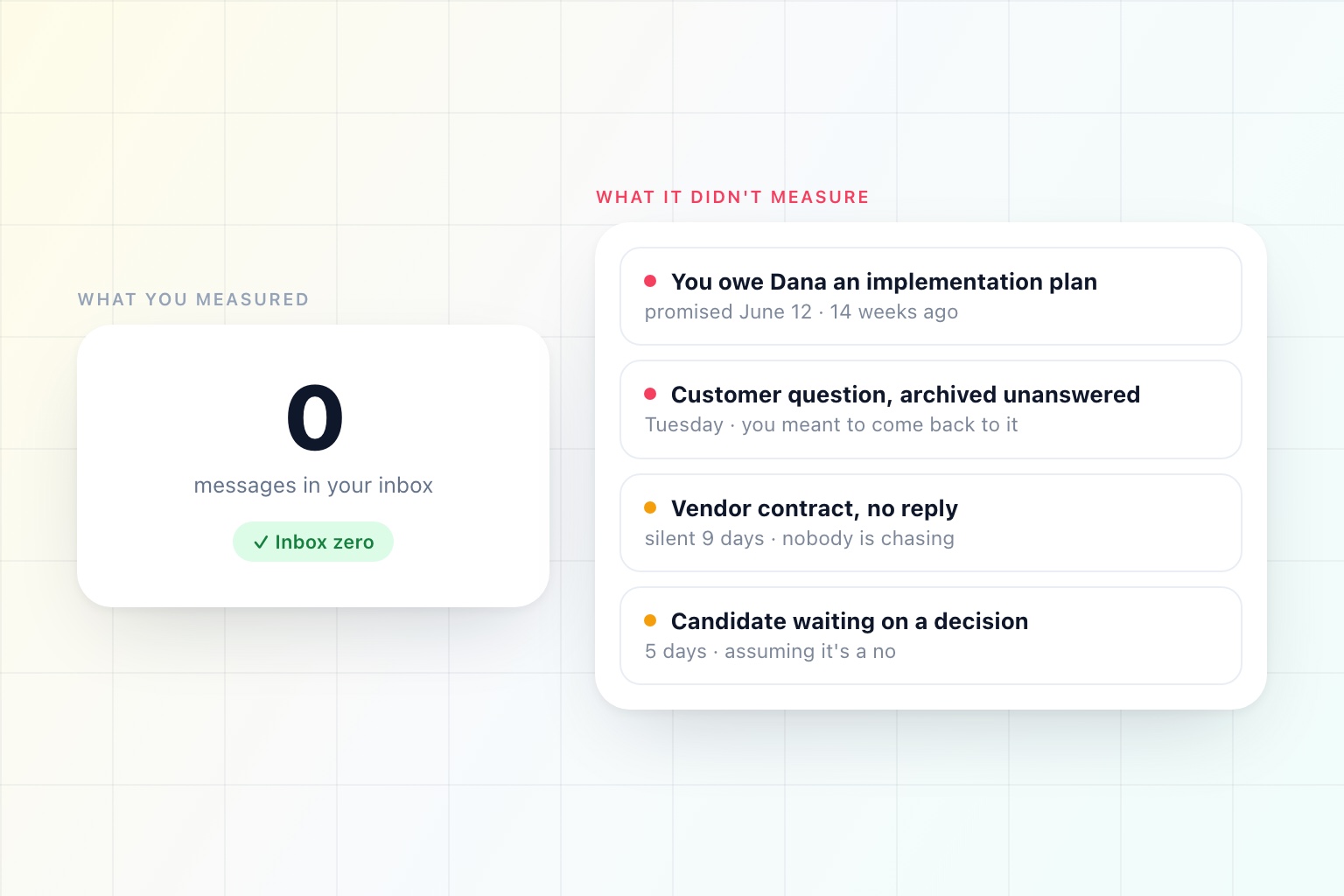
You can get to inbox zero this afternoon. Select all, archive, done. Nothing was lost — it is all still searchable — and by the only metric anyone tracks, you have just had an excellent day.
Obviously that is absurd, and the absurdity is the interesting part. It means the metric is not measuring the thing we care about. It is measuring the state of a container.
We picked that metric because for twenty years it was the only thing a computer could count.
What Your Inbox Actually Holds
Sort a week of mail by what it is rather than who sent it, and there are four kinds of thing in there.
Information. Newsletters, notifications, receipts, CCs. No action, no obligation. Genuinely fine to archive unread, and for most people the bulk of the volume.
Requests. Someone needs something from you. Most are small; a few are not; a couple are urgent in a way the subject line does not convey.
Commitments you made. You wrote "I'll get you that by Thursday" in the fourth message of a twelve-message thread, and the thread has since moved on to something else. This is the most dangerous category in your inbox and it is completely invisible to every tool you own.
Things you are owed. You asked, they said they would, and nothing has happened since. Until you remember, it does not exist.
Inbox zero handles exactly one of these well: information. It clears the 60% that never needed you and declares victory over the 40% that did.
The Four Failures It Cannot See
An empty inbox is compatible with all of the following, simultaneously:
- A customer's question, archived on Tuesday because you meant to answer it properly and never did.
- A promise you made in a thread that is now eleven messages deep and marked as read.
- A vendor who owes you a contract, who has been silent for nine days, and who nobody is chasing because the last message in the thread is theirs.
- A candidate waiting on a decision, who has already started assuming the answer is no.
Not one of those shows up as an unread count. Every one of them is a real cost — a renewal that slips, a deal that cools, a hire you lose — and the tool that told you your inbox was clean had no way to know.
This is what people mean when they say email productivity systems do not work. The systems work fine. They are just measuring the wrong object.
The Ledger Nobody Can Keep
The right model for a working inbox is not a queue. It is a ledger of open commitments in both directions: what you owe, what you are owed, and how long each has been outstanding.
People have known this for decades, which is why the good email advice has always been about building exactly that ledger by hand. Getting Things Done says extract the commitment and put it somewhere you trust. The "waiting on" label. Snooze. The Friday review. Bcc-ing yourself. All of it is manual ledger maintenance.
And it all decays, for a reason that has nothing to do with discipline.
The ledger has to be updated on every message, forever. Not most messages. Every one. Miss three days and it silently stops being trustworthy, and a ledger you do not trust is worse than no ledger, because now you check both.
Extraction is genuine work. Deciding that "sure, I'll take a look" is a commitment with an implied deadline, while "sounds good" is not, takes a small amount of judgement each time. Multiply by 200 messages a day.
It breaks exactly when you need it. Busy week, travel, a crisis — the weeks that generate the most commitments are the weeks you have least capacity to record them.
So people fall back to the one metric that maintains itself: is the inbox empty. It is a proxy chosen for its cheapness, not its accuracy.
What Changed
The thing that was hard was never the sorting. It was reading every message with enough comprehension to know what it obliges, and doing that continuously without getting tired.
That is now something software can do, and it changes which metrics are available.
"What needs you" is now computable. Not "unread," which is a fact about whether your eyes passed over something — actually needs a decision from you, separated from the CCs, the newsletters, and the acknowledgements.
"What you are waiting on" maintains itself. Every thread where you asked and nobody answered, with an age against it, without you having labelled anything.
"What you dropped" surfaces on its own. The question in message seven that nobody answered. The commitment you made before the conversation changed direction. The thread that went quiet on your side. This is the one that pays for everything else.
"What is done" stops taking up space. Not archived — resolved. A different claim.
That is the ledger, and it is now maintainable by something other than your own vigilance at 6pm on a Friday.
The Shape of a Better Default
Once the ledger exists, the interface stops being a list of messages in reverse chronological order, which is an odd way to present obligations when you think about it.
What most people actually want, once a day: the four things that need you, the six you are waiting on, the two you dropped, and everything else handled. Plus a text or a notification when something genuinely cannot wait until the digest — which is rare, and which is why it works as a signal. That is what an AI email assistant is for: not a faster inbox, a shorter one.
Two hundred messages should not produce two hundred interruptions. They should produce one summary and, occasionally, one tap on the shoulder.
The Uncomfortable Part
There is a real trade here and it deserves saying plainly: for software to maintain that ledger, it has to read your mail. All of it, including the parts you would not forward to anyone.
You cannot get "you promised Dana a draft on Thursday and Thursday was yesterday" from a tool that only sees subject lines. Comprehension is the whole product.
So the question that matters is not whether it reads your email — it does — but what it is allowed to do with what it reads. That should be a setting, and a specific one: which kinds of mail it can answer on its own, which get drafted and held for you, how long it waits before sending so you can step in, and what always escalates rather than resolving.
Most people start with everything held for approval, watch it for two weeks, and then hand over the categories they stopped reading anyway. The dial matters more than the default, because the right setting in week one and the right setting in month three are not the same setting.
If you are working out how to evaluate a tool that wants this much access, we wrote a longer checklist in How to Know If an AI Tool Is Safe to Use in 2026.
A Better Question Than "Is My Inbox Empty"
Try this one instead, on a Friday afternoon: what did I commit to this week that has not happened yet?
If you can answer that in under a minute, your email is genuinely managed, whatever the unread count says.
If you cannot — and almost nobody can, which is why the question feels slightly unpleasant to read — then the empty inbox was never telling you what you thought it was.
An empty inbox is a tidy desk. It is a pleasant thing and it is not the same as having done the work.
See it in the product
An inbox that tracks what you owe
What needs you, what you are waiting on, and what you dropped — in one digest, on your schedule.
Free plan · No credit card required