How to Know If an AI Tool Is Safe to Use in 2026
 Justin Canetti11 min read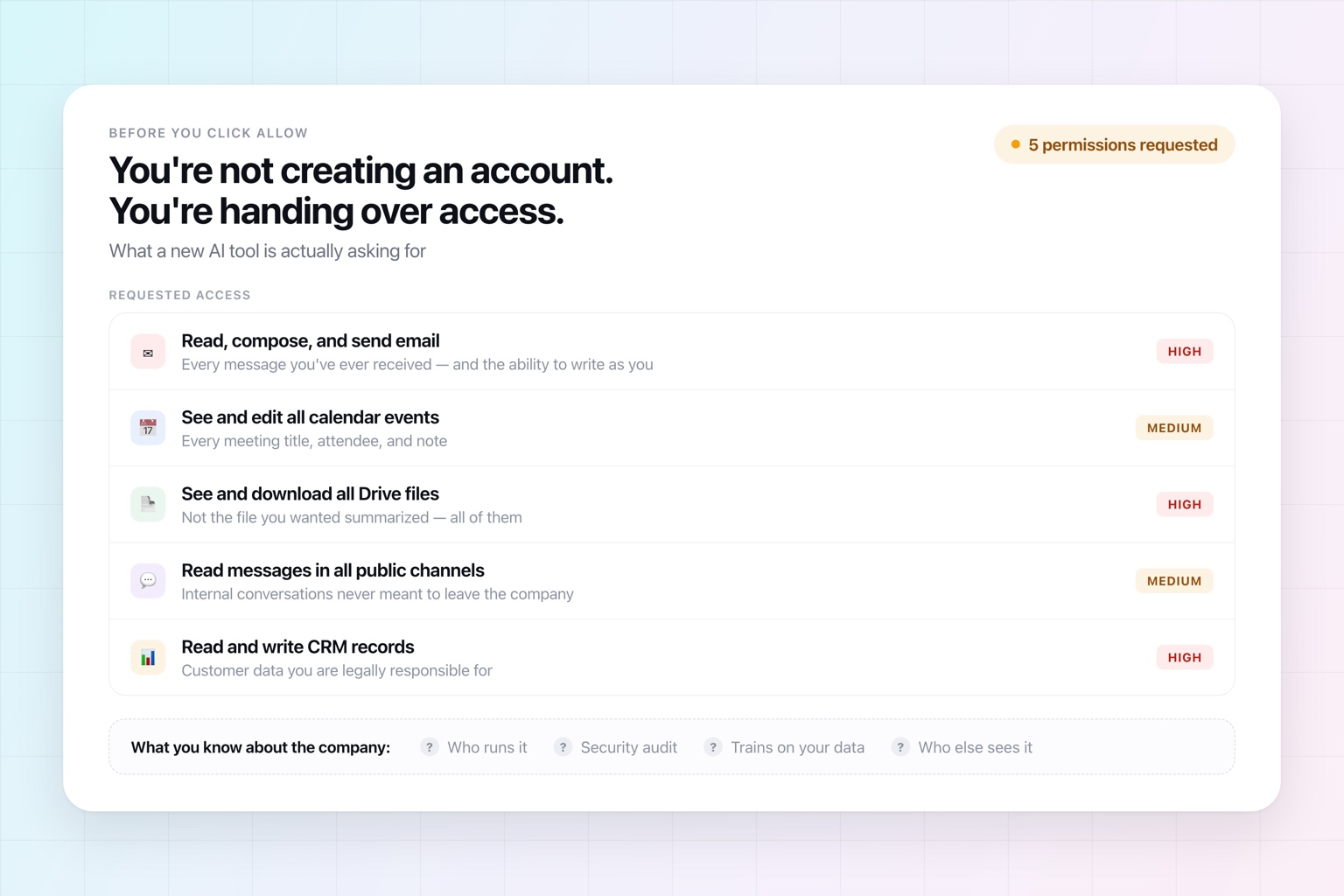
A few years ago, trying a new piece of software meant creating an account and giving it your email address. Trying a new AI tool can mean something very different.
It may ask to read your inbox, connect your calendar, access Google Drive, join your Slack workspace, read meeting transcripts, connect to your CRM, or process documents full of confidential company and customer information. In most cases that access is exactly what makes the product useful.
Meanwhile, new AI products appear constantly. Some are built by established companies with mature security programs. Others launched three weeks ago, were built by two people, and have a very polished website.
So how do you tell which AI tools are actually safe to use?
No certification or checklist can guarantee a company will never have a security incident. But there are real signals that separate a company that has taken security and privacy seriously from one that is simply asking you to trust it.
Here is what to look for:
- Look for a real Trust Center
- Understand what SOC 2 actually means
- Understand what happens to your data
- Look at who is behind the company
- Consider how it handles security incidents
- Use your head about what you connect
1. Look for a Real Trust Center
Start with the company's Trust Center or security page. For software that handles sensitive data, you should be able to find considerably more than a line about how "security is our top priority."
A good Trust Center is a window into the actual security program. You might find independent audits, encryption standards, infrastructure details, penetration testing, data retention practices, security policies, subprocessors, incident response, business continuity, and the rest of the controls a company runs.
For business software, there is often more available on request: a SOC 2 report, penetration-test summaries, individual security policies, or a Data Processing Agreement.
Having a page called "Trust Center" proves nothing by itself. Anyone can publish one. The signal is the substance behind it — specific, checkable claims rather than adjectives.
If a company wants access to sensitive business information and its entire security documentation amounts to a few marketing lines, that gap is itself the answer.
2. Understand What SOC 2 Actually Means
You'll constantly see software companies advertise that they're SOC 2 compliant. It's one of the better signals available when evaluating a provider, and it's worth understanding what it does and doesn't tell you.
SOC 2 is an independent examination performed by a CPA firm against criteria established by the American Institute of Certified Public Accountants. Depending on the audit's scope, those criteria can cover security, availability, processing integrity, confidentiality, and privacy.
In practice, it means an independent third party has evaluated whether the company has appropriate controls around things like access management, risk assessment, change management, monitoring, incident response, and protection of information.
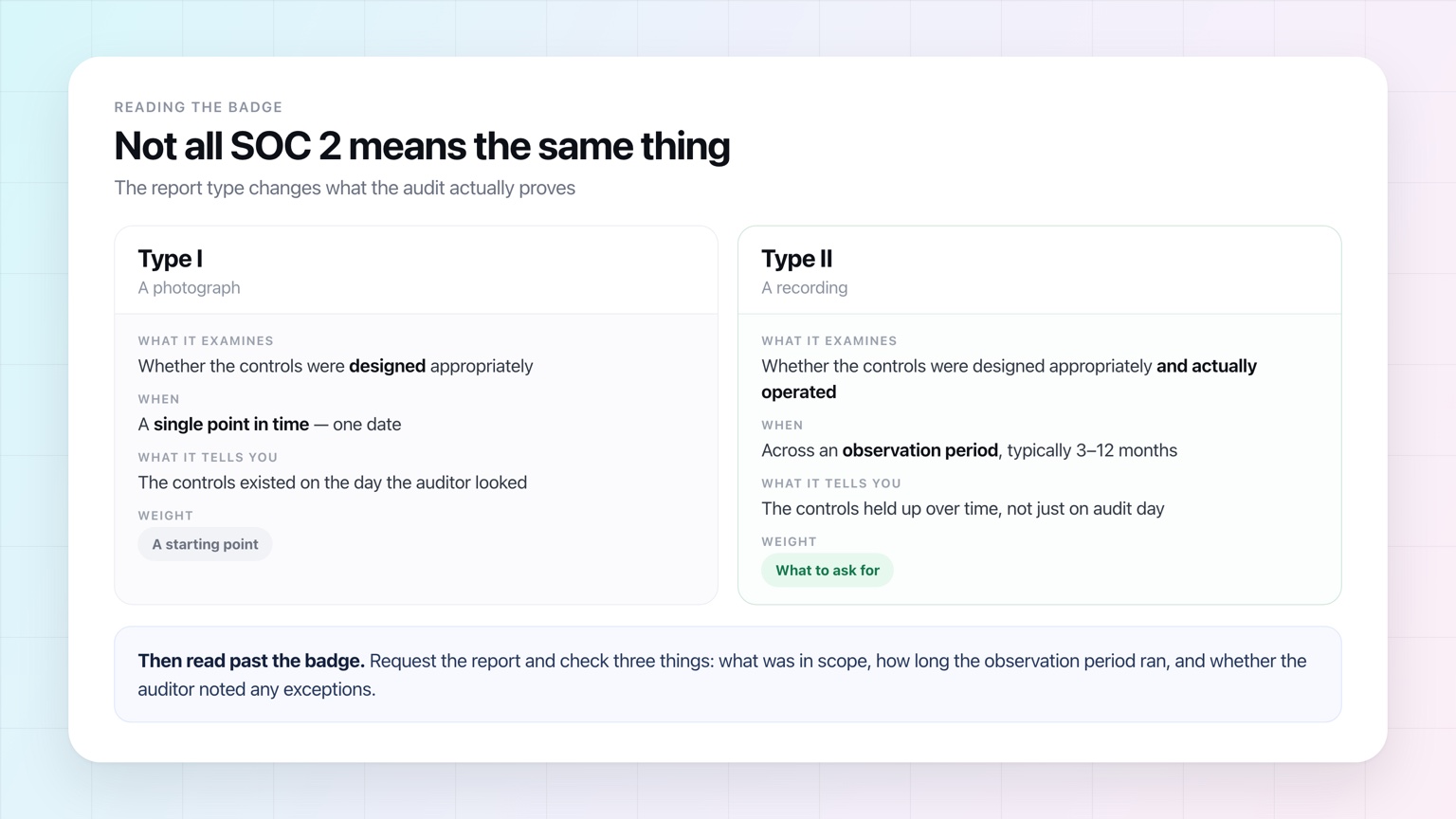
The distinction that matters most is the report type. A Type I report evaluates the design of controls at a single point in time. A Type II report evaluates whether those controls actually operated effectively across a period, typically three to twelve months. If you're evaluating software that will handle sensitive information, Type II is the meaningful one.
SOC 2 doesn't mean a company can never be breached, and it doesn't mean any part of the product has been independently declared "safe." It means the company's security practices have been examined by someone other than the company.
For anything sensitive, you can usually request the report itself. When you get it, read past the cover: check what was in scope, how long the observation period ran, and whether the auditor noted any exceptions.
3. Understand What Actually Happens to Your Data
Security controls tell you how a company protects your data. They don't tell you what the company is permitted to do with it. Those are different questions, and the second one is often the more consequential.
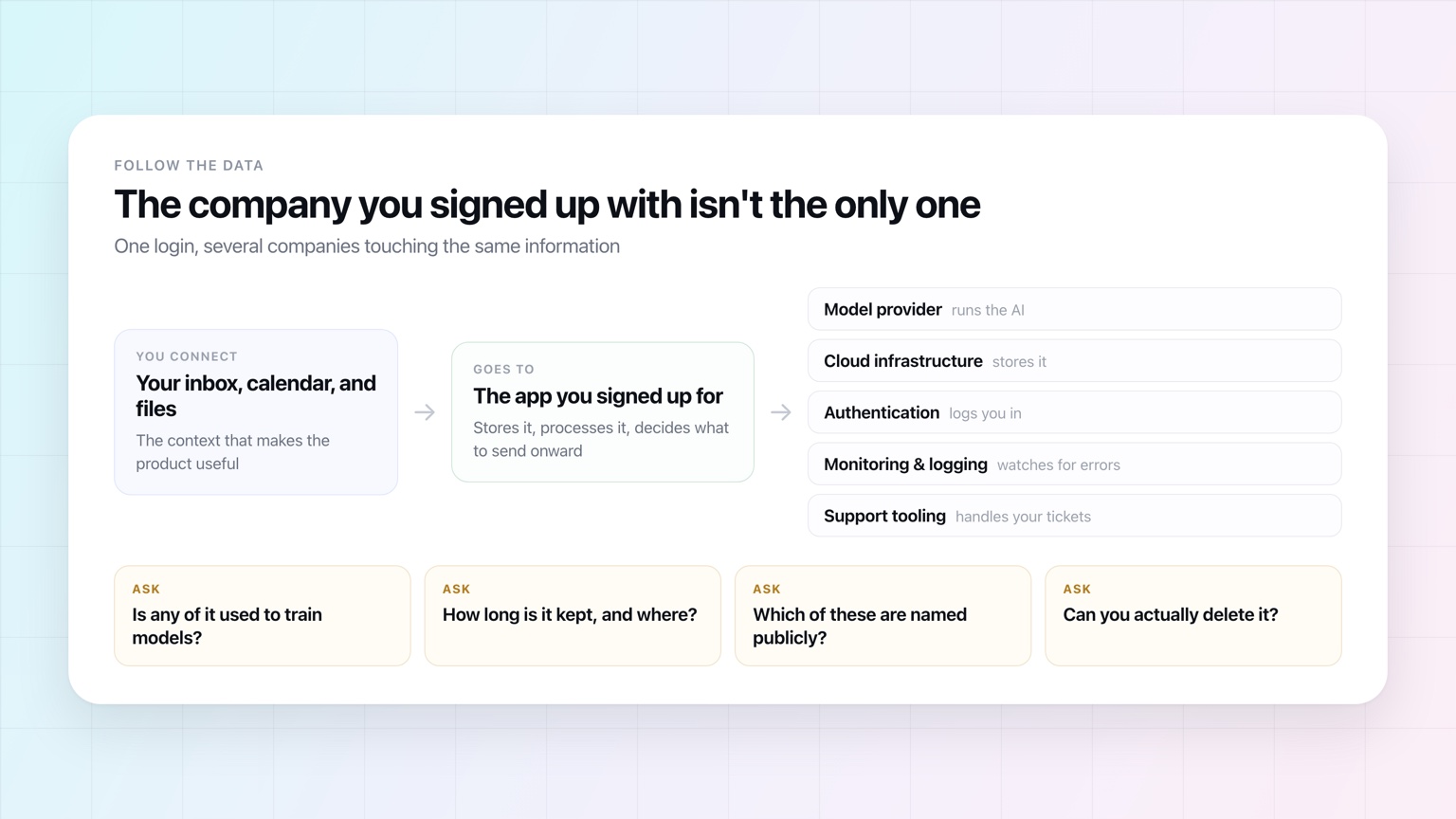
It matters more with AI products because your data may pass through several systems. The application you signed up for may process your information itself and also send some of it to OpenAI, Anthropic, Google, or another model provider.
Start with the biggest AI-specific question: is your data used to train AI models?
A company should answer that plainly. Two things to watch for. First, vague phrasing — "to improve our services" can quietly include model training. Second, don't assume the answer follows from which model the product runs on. An application built on a third-party model has its own policies on top of the provider's, and consumer plans frequently differ from business plans on exactly this point.
Next, retention. Data that isn't used for training may still be stored for product functionality, security monitoring, abuse prevention, or debugging. A company should be able to tell you what it keeps and for how long. Some providers also offer reduced-retention or zero-retention arrangements for sensitive use cases.
Then deletion. Can you delete conversations, uploaded files, connected-account data, and your account itself? What happens to organizational data when a business customer leaves? Backups and security logs reasonably run on different schedules, but there should be a defined process rather than an indefinite silence.
Then subprocessors — the other companies involved in delivering the service. Almost every modern software company uses them. An AI product might run on AWS or Azure, use OpenAI or Anthropic for inference, and rely on other vendors for authentication, communications, monitoring, or support.
That's normal, and not a red flag. The transparency is the signal. A company handling sensitive information should be able to name the important third parties that process it and say what each one does. A missing list doesn't mean there are no subprocessors — it means you can't count them.
Finally, the Terms of Service and Privacy Policy. You don't have to read every line, but do read the sections on customer content, data ownership, licenses, AI training, product improvement, retention, and termination.
Some license to process your data is necessary for any cloud product to function. If you upload a document and ask software to summarize it, the company plainly needs permission to process that document. But there's a real difference between permission to use your content to provide the service to you and a broad license to use it for unrelated purposes.
The underlying question is simple: once I hand this company my data, where does it go, how is it used, how long does it stay, and can I get rid of it?
A company handling sensitive information should have clear answers to all four.
4. Look at Who Is Actually Behind the Company
Less technical, but with the number of AI products launching every week, worth a few minutes.
A company doesn't need to be fifteen years old to be secure. Plenty of excellent software comes from new companies. But there should be a real organization and identifiable people behind a product asking for significant access to your data.
Look at who founded it, how long it has been operating, whether the team has experience building software or running security-sensitive systems, and whether a real legal entity is named in the terms and privacy documentation.
Look for basic signs of accountability, too. Is there a way to contact the company? A security contact for reporting vulnerabilities? Are the founders and employees identifiable? Does anyone publicly stand behind what's being built?
There's a real difference between accepting some startup risk from a named team with a documented security program and handing your inbox to an anonymous product that appeared online last week.
5. Consider How the Company Handles Security Incidents
No responsible software company can promise it will never have a security incident. The better question is whether it has prepared for one.
A mature program includes processes for identifying, investigating, containing, and responding to incidents. For business customers, it should also include a defined process for notifying affected customers when an incident involves their data.
You'll typically find this in the Trust Center, the security documentation, the SOC 2 report, or a Data Processing Agreement. You don't need to evaluate an entire incident-response program. Its existence tells you the useful thing: the company treats security as an ongoing operational responsibility rather than a feature it finished building once.
The same goes for vulnerability management. Independent penetration testing, a way to report vulnerabilities, monitoring, and regular security reviews all suggest a company actively looking for problems instead of assuming it has none.
6. Use Your Head About What You Connect
Even once a company looks trustworthy, you still get to decide what you give it.
AI products increasingly ask to connect to email, calendars, files, Slack, and CRMs because that context is what makes them useful. That isn't inherently a red flag. An assistant can't manage your calendar without seeing your calendar, and it can't triage your inbox without reading your email.
But you don't have to approve everything at once.
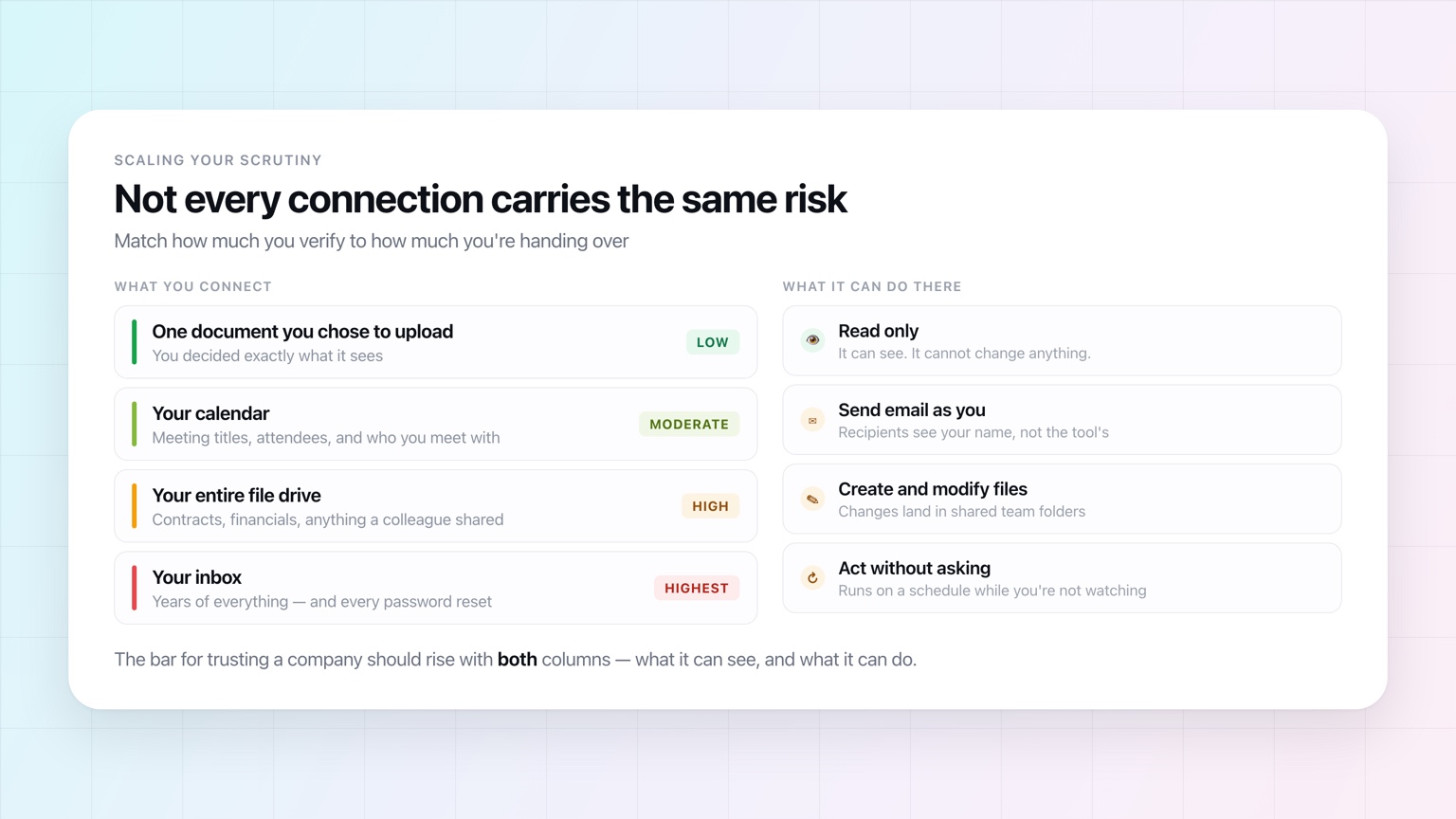
Think about what you're connecting, what actually lives there, and what you're getting in return. You might be entirely comfortable connecting your calendar to a new product while wanting to know more before handing over your whole inbox. You might happily upload a generic document but stop short of customer records or financials.
The same applies to what a product can do, which is a separate question from what it can see. If an application can send email as you, modify shared files, create events, or act on your behalf while you're not watching, understand why it needs that authority before granting it.
There's no universal rule for how much access is too much. The point is to decide consciously, and to scale your scrutiny to the sensitivity of what's involved.
The more sensitive the data and the more authority you hand over, the higher your bar for the company should be.
A Quick AI Security Check
You don't need to run enterprise vendor due diligence every time you try an AI application. For most products you can get a surprisingly good read in a few minutes.
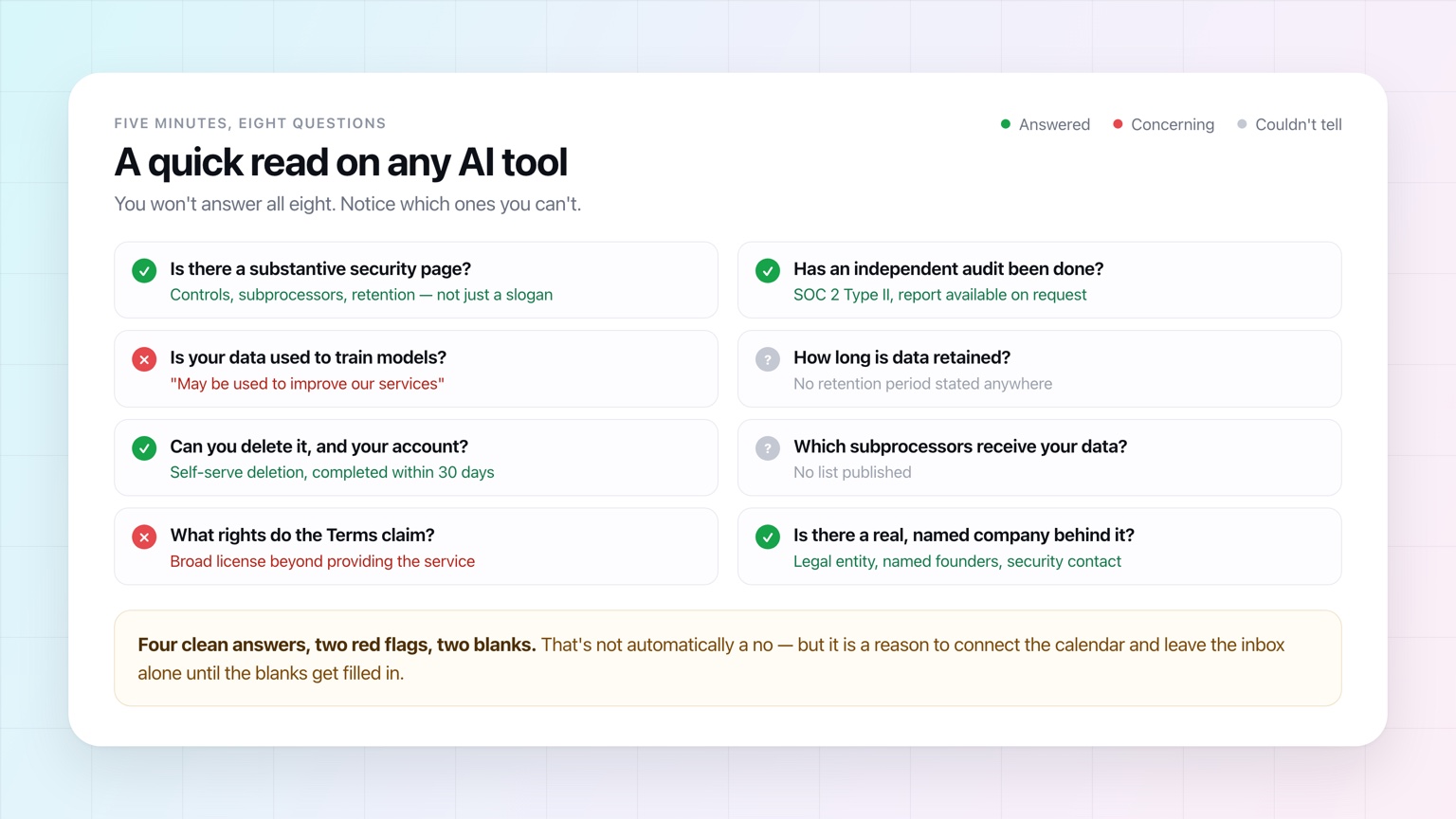
Before giving a new AI product meaningful access to your data, check:
- Does it have a substantive Trust Center or security page?
- Has it completed an independent security audit such as SOC 2 Type II?
- Is your data used for AI training or model improvement?
- How long is your data retained, and can you delete it?
- Which AI providers and other subprocessors receive your data?
- What rights does the company claim over your content in its Terms of Service?
- Is there a real, identifiable company and team behind the product?
- Are you comfortable with the specific data and permissions you're granting?
You won't always get a clean answer to all eight, especially from a very new company, and that doesn't automatically make a product unsafe. But notice which questions you couldn't answer — and let the evidence you require rise with the trust the product is asking for.
Frequently Asked Questions
Is it safe to connect an AI tool to my work email?
It depends far more on the company than on the category. Your inbox is the highest-value thing you can connect — it holds years of correspondence and every password reset — so it deserves the most scrutiny. Before connecting it, look for an independent audit such as SOC 2 Type II, a clear statement that your data is not used to train models, a published retention period, a named list of subprocessors, and a real legal entity behind the product. If those are missing, connect something lower-stakes like your calendar first.
Does SOC 2 mean an AI tool is secure?
It means an independent CPA firm examined the company's controls against established criteria — not that the product is guaranteed safe or that a breach can never happen. A Type I report only says the controls were designed appropriately on a single date. A Type II report says they also operated effectively across a period of months, which is the more meaningful signal. For sensitive use, request the report itself and check the scope, the observation period, and any exceptions the auditor noted.
How do I find out if an AI tool trains on my data?
Look for an explicit statement in the privacy policy, terms, or security page — and be wary of vague phrasing like "to improve our services," which can cover model training. Don't assume the answer follows from which AI model the product uses: an application built on a third-party model has its own policies in addition to the model provider's, and consumer plans often differ from business plans on exactly this point.
What is a subprocessor, and why does it matter?
A subprocessor is another company involved in delivering the service — the cloud host that stores your data, the model provider that runs the AI, the tools that handle login, monitoring, or support. Nearly every modern software product uses several. Their existence isn't a problem; the absence of a published list is what should give you pause, because it means you can't tell how many companies are touching your information.
What should I look for in an AI tool's terms of service?
Focus on the sections covering customer content, data ownership, licenses, AI training, product improvement, retention, and termination. Every cloud product needs some license to process your content — it cannot summarize a document it isn't allowed to read. The distinction that matters is between a license to process your content in order to provide the service to you, and a broad license to use that content for other purposes.
How much due diligence is enough before trying a new AI tool?
Scale it to what you're handing over. Uploading one document you chose deserves almost none. Granting standing access to your inbox, your file drive, or your CRM — especially with the ability to send email or take actions on your behalf — deserves a real look at the company's security documentation, audit status, data policies, and who actually runs it.
The More Useful AI Becomes, the More Trust Matters
There's a tension built into this generation of AI software: the products get dramatically more useful when they have context.
An AI assistant that knows nothing about you can answer questions. One that understands your calendar, email, documents, projects, and conversations can help run your work — and increasingly, take actions on your behalf.
That asks for a different kind of trust than using a chatbot to brainstorm.
The answer isn't to refuse to connect AI to anything, which would give up most of what makes these products worth using. The answer is to be deliberate about which companies earn that access, and to expect the security practices behind AI products to mature alongside their capabilities.
We've tried to hold up our end of that. OpenAssistant is built by 3Gen Internet Corporation. Our security program includes SOC 2 Type II auditing by an independent CPA firm, annual third-party penetration testing, AES-256 encryption at rest and TLS 1.2+ in transit, role-based access controls, and account deletion you can trigger yourself at any time. We don't train on your data, and our AI providers are contractually prohibited from doing so. Every subprocessor we use is listed publicly and security reviewed before onboarding. The Trust Center has the details, and the SOC 2 Type II report is available on request.
We built it that way because an assistant shouldn't be treated like a novelty app. If you're going to give software the kind of access you'd give a trusted human assistant — your calendar, your communications, your files, and increasingly the ability to act for you — a much higher standard is reasonable to expect.
As AI asks for more access to our work, getting comfortable evaluating who we hand it to is going to matter more and more.
Read our answers before you connect anything
Our Trust Center lists the audits, controls, retention practices, and every subprocessor that touches customer data.