8 Best Calendly Alternatives for 2026
 Justin Canetti11 min read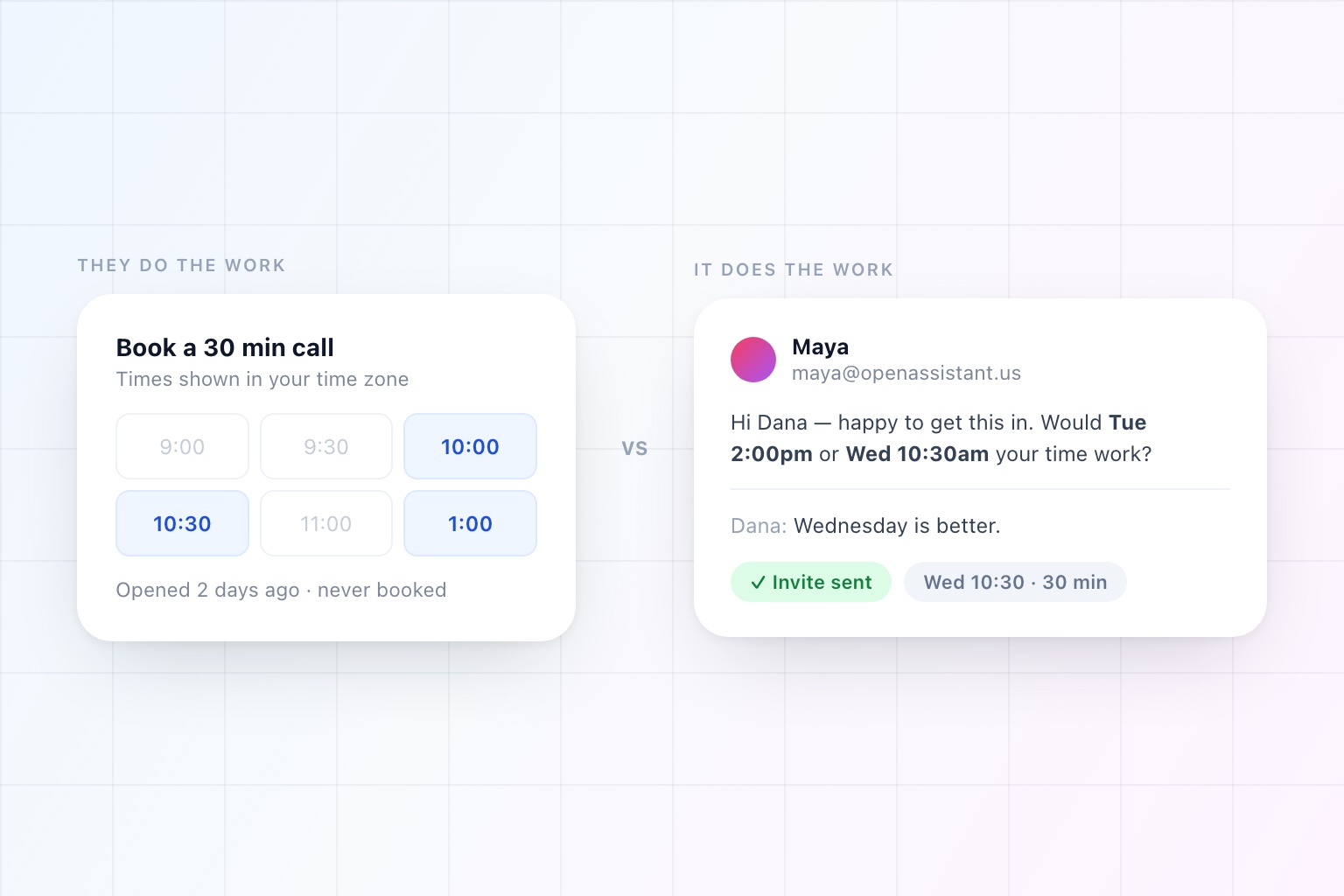
Calendly won for a good reason. Before booking links, arranging a meeting with someone outside your company meant four emails minimum, and at least one of them said "unfortunately that just filled up." A link collapsed all of that into one click.
Then everyone got one. Now a link arrives in your inbox and it is your problem: open the page, work out what those slots are in your time zone, cross-reference your own calendar in another tab, and pick something that is merely tolerable.
So people go looking for alternatives. Usually for one of three reasons:
- The free tier ran out. One event type stops being enough the moment you have an intro call, a demo, and an interview that need different lengths and different availability.
- The booking page is the weak point. It asks too much of the recipient, or it does not look like it belongs to your company.
- The link is not actually the problem. A link only helps when it is appropriate to send one. It does you no good at all with a client, an investor, or a candidate's hiring panel.
This is a list of eight alternatives, grouped honestly: the ones that are better booking links, and the ones that get rid of the link.
Calendly Alternatives at a Glance
| Tool | What it is | Best for |
|---|---|---|
| OpenAssistant | Assistant that emails people | Handing scheduling off entirely, including the follow-ups |
| Skej | Assistant that emails people | Cc-based scheduling for people who only want scheduling |
| Cal.com | Booking link (open source) | Self-hosting, or embedding scheduling in your own product |
| SavvyCal | Booking link | Making the link less annoying for the person receiving it |
| Acuity Scheduling | Appointment booking | Client appointments, intake forms, and taking payment |
| HubSpot Meetings | Booking link | Sales teams who want every booking attached to a CRM record |
| Google Calendar appointment schedules | Booking link (built in) | Replacing a paid link with something already in your account |
| Doodle | Group poll | One-off group meetings where nobody shares a calendar system |
Capability details reflect each product's public documentation as of September 2026.
What to Look for in a Calendly Alternative
Before the list, the four questions that actually decide this:
Who does the work? Every booking link moves the scheduling labor onto the person you are meeting. That is a fine trade with a warm inbound lead and a bad one with someone senior. Ask who you are mostly scheduling with.
How many meeting types do you run? If the answer is one, almost anything free will do. If it is six, with different durations, locations, buffers, and availability windows, the free tiers disappear fast.
Does it handle group meetings? Finding one slot for five people across three companies is a different problem from booking one-on-one, and most link tools solve it with a poll, which is its own kind of tax.
What happens when nobody replies? This is the question nobody asks and everybody pays for. A link that is never clicked does not tell you it was never clicked.
1. OpenAssistant — Best for Handing Scheduling Off Entirely
OpenAssistant is not a booking link. It is an AI scheduling assistant with its own name, face, email address, and phone number, and scheduling is one of the things you can give it.
You Cc it on a thread. It reads the conversation, checks your calendar, writes to the other person in plain language, proposes times that work for both of you, handles the replies, and sends the invite. The other person does not click anything, does not sign up for anything, and does not need to know they are corresponding with an assistant.
That covers the case a link cannot: the people you should not be sending a link to. It also covers the one booking pages quietly fail at, which is silence — it follows up on a cadence you set until the meeting is actually on the calendar.
You can still use booking links here, one per meeting type, each with its own length, location, and availability. They are an option rather than the whole product.
Best for: Anyone whose scheduling involves negotiation rather than slot-picking — founders, recruiters, salespeople, executives, anyone coordinating across companies.
Worth knowing: It is a general assistant, not a scheduling app. If all you want is a prettier booking page, this is more than you need.
2. Skej — Best Scheduling-Only AI Assistant
Skej is the closest product on this list to the assistant model. You add it to an email thread and it checks calendars, proposes times, talks to the attendees, handles the replies, reschedules when plans change, and books the meeting. The experience is deliberately close to delegating to a person rather than configuring a tool, and it supports booking links for the cases where self-service genuinely is better.
If your problem is precisely and only scheduling, that focus is a reasonable thing to buy.
Best for: People who want cc-based scheduling and nothing else.
Worth knowing: Scheduling is the product. The inbox triage, the meeting briefs, the research, and the recurring work that sit next to scheduling in most people's days are a different purchase.
3. Cal.com — Best Open-Source Calendly Alternative
Cal.com is the closest thing to a like-for-like Calendly replacement, with the significant difference that it is open source and you can run it yourself.
The hosted version does what you expect: booking pages, calendar sync, reminders, round-robin and collective team scheduling, payments through Stripe, and a large integration library. The self-hosted version does the same on your own infrastructure, which matters if your security team has opinions about where meeting data lives.
Its other advantage is the API. If you are building scheduling into your own product, Cal.com is designed for that in a way most booking tools are not.
Best for: Teams who want Calendly's shape without Calendly, developers embedding scheduling, and anyone whose compliance review makes self-hosting the easy answer.
Worth knowing: Self-hosting is only free in the sense that your own time is free.
4. SavvyCal — Best Booking Page for the Recipient
SavvyCal's premise is the sharpest of any link tool: the person receiving your link is doing unpaid work, so make it less work.
Its signature feature is calendar overlay. The recipient connects their own calendar and sees their events laid over your availability, in a week view rather than the usual click-a-day-then-click-a-time dance. They pick a time that genuinely works instead of one that merely appears free.
It also does the things you would expect at this tier: buffers, meeting limits, preferred slots that nudge people toward the times you actually want, collective and round-robin team modes, meeting polls, and custom domains so the link looks like yours.
Best for: People who send links to peers and want to seem considerate while doing it.
Worth knowing: It is still a link. The overlay makes the work pleasant; it does not remove it.
5. Acuity Scheduling — Best for Client Appointments
Acuity is aimed at a different job than Calendly, and if it is your job, it is not close. This is appointment booking for businesses that see clients: intake forms, packages and memberships, class scheduling, payment at the time of booking, and reminders that reduce no-shows.
If you run a practice, a studio, or a service business, the features you need are the ones Acuity treats as core rather than as upsells.
Best for: Client-facing businesses that take bookings and payment from the public.
Worth knowing: For internal or B2B meeting coordination it is heavier than the job requires.
6. HubSpot Meetings — Best Free Option for Sales Teams
If your company already runs on HubSpot, its meetings tool is a booking link that happens to be attached to your CRM. Every booking creates or updates a contact record, logs against the deal, and shows up in the same timeline as the emails and calls.
That integration is the whole argument. As a standalone booking page it is unremarkable; as a way to stop reps manually logging meetings, it earns its place.
Best for: Sales teams on HubSpot who care more about attribution than about the booking page.
Worth knowing: The value drops sharply the moment your CRM is something else.
7. Google Calendar Appointment Schedules — Best Free Built-In
Worth a paragraph because a surprising number of people pay for a link they already have. Google Calendar includes appointment schedules: a public booking page, availability windows, buffers, and booking confirmations, using the calendar you already keep.
It is basic. Multiple complex meeting types, team round-robin, and deep integrations are not what it is for. But if you send one kind of link a few times a month, it is free and it is already switched on.
Best for: Light users who would rather not add a tool.
Worth knowing: Some capabilities depend on your Google Workspace edition.
8. Doodle — Best for One-Off Group Meetings
Doodle solves a specific, real problem: eight people, four organizations, no shared calendar, one meeting. You propose times, everyone marks what works, and the winner is obvious.
It is genuinely the right tool when there is no other way to see those calendars. It is also a poll, which means everyone involved does a small amount of work and the result is a compromise rather than an answer.
Best for: Committees, external working groups, and anything where you cannot see the other calendars.
Worth knowing: Polls scale badly. Every added participant makes agreement less likely, not more.
The Real Question: Who Does the Work?
Strip the feature lists away and this list has two halves.
Booking links move the work to the other person. Cal.com, SavvyCal, Acuity, HubSpot, Google, Doodle — they differ in how gracefully they do it, and SavvyCal in particular is thoughtful about it, but the recipient still opens something, reads something, and decides something.
Assistants do the work themselves. They write the email, read the reply, handle "can we do Thursday instead," and keep going until it is booked.
Neither is universally right. A link is perfect for inbound demo requests, where the other person came to you and wants it over with quickly. An assistant is the only option that works for the meetings that actually matter, where sending a link would be the wrong move and the follow-up is the hard part.
Most people need both, which is the practical case for a tool that treats the link as one feature rather than the entire product.
Which Calendly Alternative Should You Choose?
- You want scheduling handled over email, nothing more: Skej
- You want Calendly, but open source or self-hosted: Cal.com
- You want a booking page that respects the recipient: SavvyCal
- You book client appointments and take payment: Acuity
- Your company runs on HubSpot: HubSpot Meetings
- You send one link occasionally: Google Calendar appointment schedules
- You are coordinating a big external group, once: Doodle
- You want to stop doing scheduling at all, links included: OpenAssistant
If you are still deciding between the AI options specifically, we compared them in more depth in 9 Best AI Calendar Assistants for 2026, and made the case against the open-ended scheduling email in Why "What Time Works for You?" Is a Terrible Way to Schedule Meetings.
The Booking Link Was a Workaround
It is worth remembering what a booking link is. It is a clever workaround for the fact that software could not read an email, understand a request, and write back like a person. For fifteen years, that was a hard constraint, and the link was the best available answer to it.
That constraint is gone. Which means the question is no longer which booking page to send, but whether the meeting needed you to send anything at all.
Frequently Asked Questions
Is there a free alternative to Calendly?
Several. Google Calendar's appointment schedules are built into an account you already have, Cal.com has a free tier and can be self-hosted, and HubSpot's meetings tool comes with its free CRM tier if your company already runs on HubSpot. The free tiers usually limit you to one or two meeting types, which is the point most people outgrow.
What is the best open-source Calendly alternative?
Cal.com. It covers the same ground as Calendly — booking pages, calendar sync, reminders, round-robin and collective team scheduling, payments via Stripe — and you can self-host it with Docker if you would rather your meeting data stayed on your own infrastructure. It is also the most straightforward to build on if you are embedding scheduling into your own product, since the platform is open source and the API is public.
Why do people stop using booking links?
Because a link only helps when it is appropriate to send one. With a customer, an investor, or a candidate's hiring panel, sending a link asks the more important person to do the work, which is why most people quietly stop using theirs for the meetings that actually matter.
What happens when nobody clicks the booking link?
Nothing, which is the problem. A link that is never opened does not tell you it was never opened, so the meeting simply does not happen and you find out weeks later. An assistant that follows up on a cadence you set closes that gap; a booking page cannot.
Can an AI scheduling assistant replace Calendly entirely?
For most people, yes — and it can still give you booking links for the cases where self-service is genuinely better, like inbound demo requests. The difference is that the link becomes one feature rather than the whole product, so you are not forced to choose between sending a link and writing the emails yourself.
See it in the product
Stop sending links. Start delegating meetings.
Cc your assistant on any thread. It proposes times, chases the people who go quiet, and sends the invite.
Free plan · No credit card required