20 Tasks You Can Automate With AI at Work in 2026
 Justin Canetti10 min read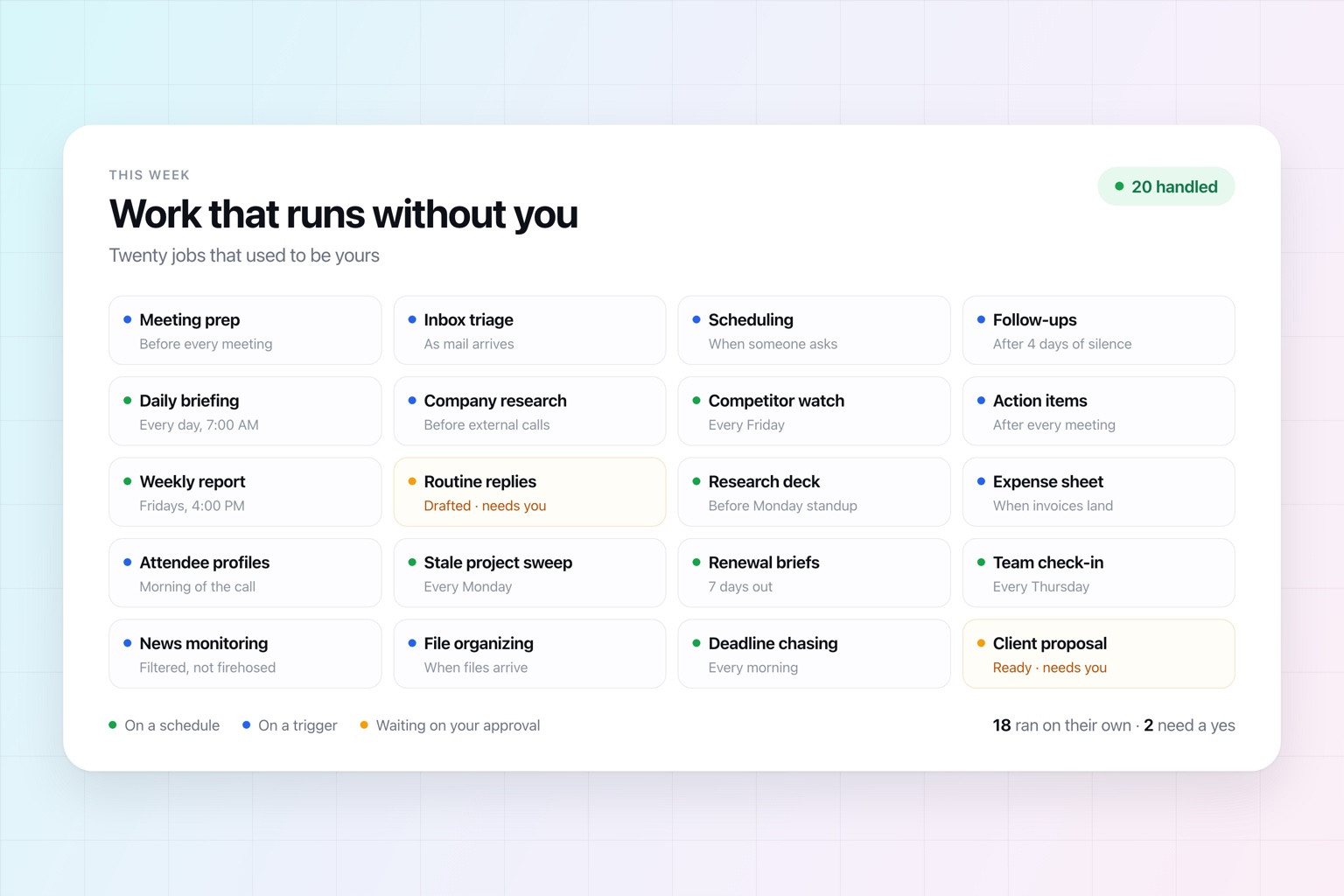
AI can write an email in ten seconds. That's useful. It also may not save you much time.
You still had to notice the email, decide it needed a reply, open an AI tool, explain the context, paste the draft back into your inbox, send it, and remember to chase it if nobody answers. AI took one step off a task that still belonged to you.
So the more interesting question isn't what can AI help me do faster? It's what work can I stop doing altogether?
Today's assistants can act across email, calendars, documents, the web, and the other tools your company runs on. They can also start work on a schedule or in response to something happening, which means you don't have to be the one who kicks off every task.
The best candidates usually aren't the biggest jobs. They're the dozens of small ones that quietly consume your week: checking, coordinating, researching, organizing, reminding, preparing, and following up.
Here are 20 good places to start. (If you're earlier in this than the list assumes, our guide to how to use AI at work is the shorter version.)
Your inbox and calendar
Research and reporting
Deliverables and accounts
1. Prepare for Meetings
Meeting prep is the perfect example of work that is genuinely valuable and completely repetitive. Before an important call you look up the attendees, skim their company's site, dig through old email, reread your notes from last time, and work out what you actually need from the conversation.
An assistant can assemble all of that on its own: attendee backgrounds, company details, your previous conversations, the relevant documents, and a few suggested talking points.
The point isn't that AI can research someone. It's that meeting prep can become a standing responsibility — brief me 30 minutes before every external meeting — instead of something you have to remember to do.
2. Triage Your Inbox
Most inboxes are a mix of three things: what needs action, what's worth knowing, and what barely deserved to arrive.
An assistant can take the first pass. Summarize the long threads. Flag what needs a reply. Separate urgent from merely loud. Archive the obvious clutter. Draft responses to the messages that earned one.
Instead of reading 60 messages to find the six that matter, you start with the six.
3. Schedule Meetings
Scheduling isn't hard. It's just relentless.
Someone asks to meet. You check your calendar, offer three times, wait, learn none of them work, check again, land on a fourth, create the event, add the video link, and update the invite when someone inevitably moves it.
An assistant connected to your calendar and email can own that entire exchange. The task isn't "find three open times." It's get the meeting on the calendar.
It also spares you the worst habit in scheduling: opening with "what time works for you?" and starting a thread that runs all week. If you're comparing tools built for this specifically, we reviewed nine AI calendar assistants in detail.
4. Follow Up on Unanswered Emails
A lot of follow-up isn't important enough to earn a task in your project tracker, but still costs you something when it's forgotten. You sent something. You're waiting. If nothing comes back, someone has to notice.
Tell your assistant to follow up with a prospect who goes quiet for four days, remind a coworker about the document they promised, or check whether a customer ever answered your question.
You're not automating an email. You're automating the remembering.
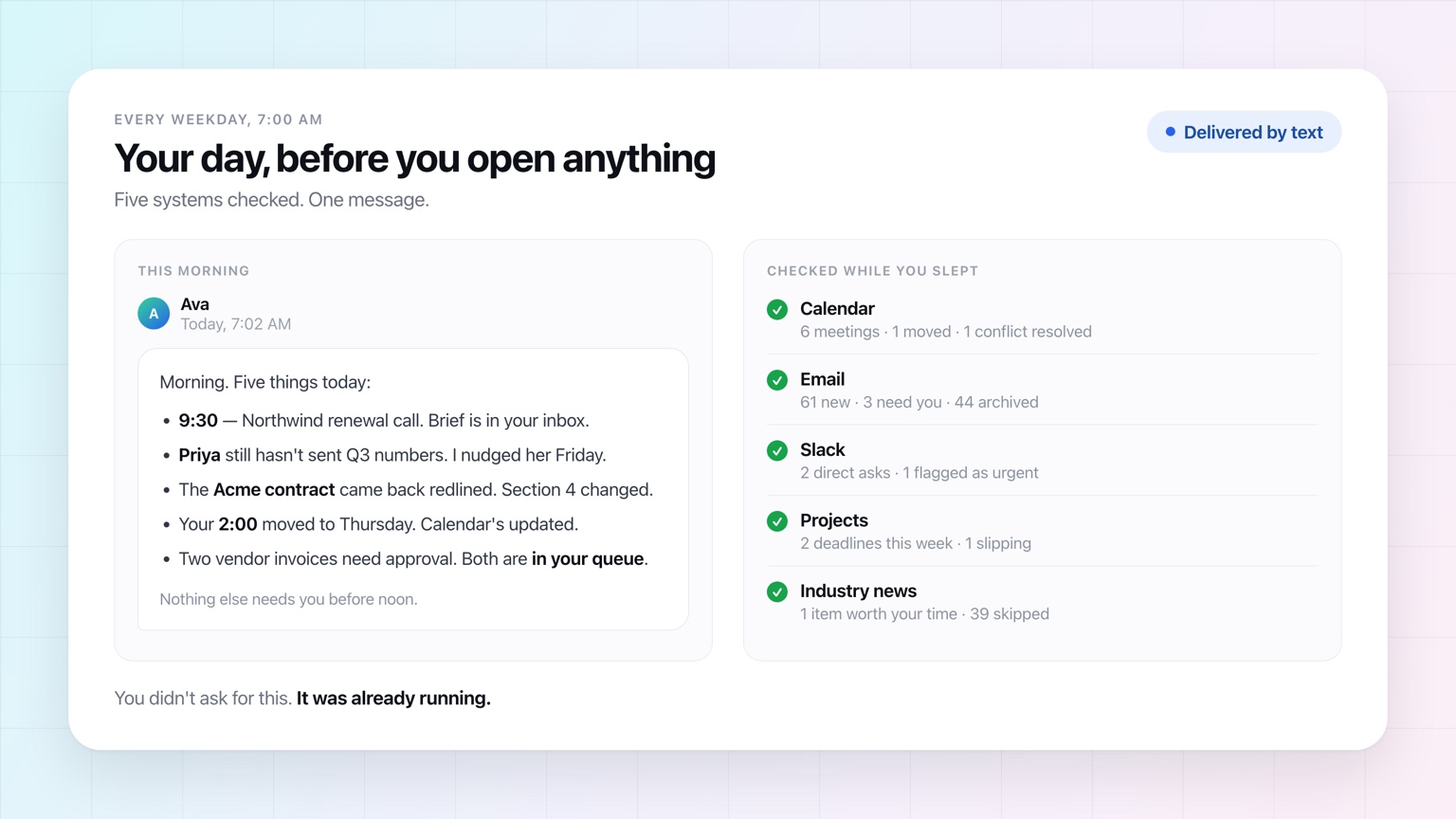
5. Create a Daily Briefing
Think about the first 20 minutes of your day: calendar, inbox, Slack, task list, maybe a couple of sources relevant to your business.
Almost all of that is gathering, not deciding.
An assistant can do the gathering before you're awake and hand you one short briefing — what's on your calendar, what changed overnight, what needs a decision, what you're still waiting on.
The result isn't another dashboard. It's fewer dashboards you have to open.
6. Research Companies Before Calls
Research is the most obvious use of AI, and it gets far more valuable when it's wired into a real business process instead of typed into a chat window.
A salesperson shouldn't have to remember to research every prospect. A founder shouldn't spend the five minutes before an investor call frantically opening tabs. A customer success manager shouldn't be reconstructing an account from scratch the morning of a renewal call.
Attach the research to the trigger — a meeting getting booked, a deal changing stages, a renewal date approaching — and it stops depending on anyone's memory.
7. Monitor Competitors
Competitive research is useful precisely because the market keeps moving, which is exactly what makes it tedious to do by hand.
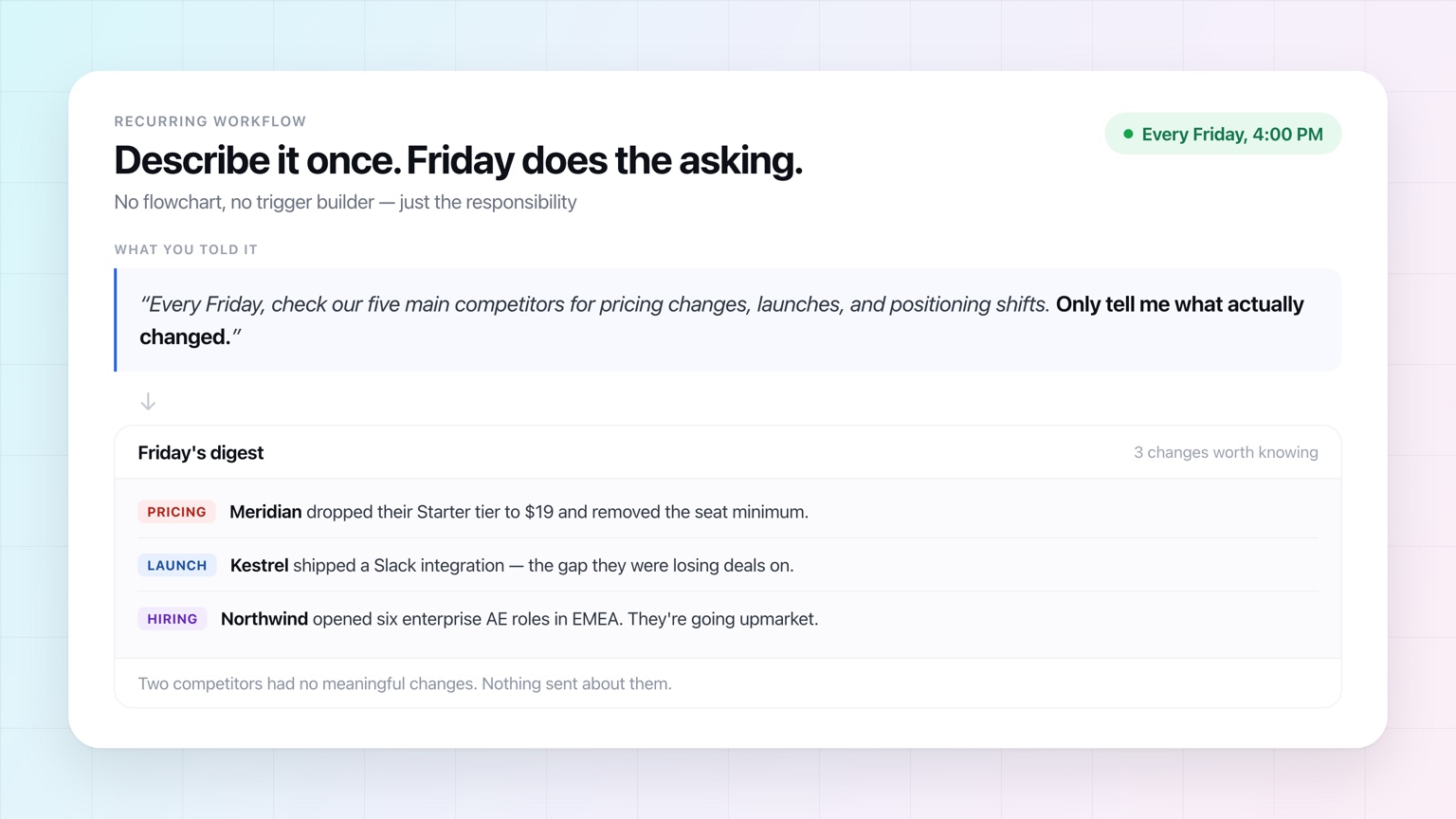
Make it recurring instead. Every Friday, have your assistant check your main competitors for launches, pricing changes, positioning shifts, new partnerships, or notable hiring.
Then add the instruction that makes it worth reading: only tell me what actually changed. A weekly digest that says "no news" trains you to ignore it.
8. Turn Meetings Into Action Items
The admin around a meeting routinely outlives the meeting. Someone has to capture the decisions, pull out the action items, assign owners, send the recap, and make sure the things everyone agreed to actually happen.
An assistant can turn notes or a transcript into a structured recap — but don't stop at the recap. Have it create the tasks, draft the follow-up email, update the project, and nudge owners as deadlines get close.
The useful output of a meeting isn't a summary. It's what happens next.
9. Create Recurring Reports
Weekly sales summaries. Monthly marketing reports. Project status updates. Customer health. Expense roll-ups.
Most reports are the same process run against new data, which makes them close to ideal automation candidates.
The shift is small but real: instead of asking for the report every Friday, define once what the report should contain and let Friday be the trigger. It arrives because it's Friday — not because someone remembered to ask.
10. Draft Routine Responses
Not every email deserves original prose.
Questions about pricing, scheduling, onboarding, policies, next steps, or the same three product issues tend to follow familiar shapes. An assistant can draft from the actual conversation rather than pasting a canned template that reads like one.
For anything sensitive or customer-facing, leave approval on. You can remove most of the work and still keep the last word.
11. Build Presentations From Research
"Research this" is usually just the opening of a real assignment.
If you're researching a market because you have to present it Monday, the actual job is closer to: research the market, pull out what matters, turn it into a deck, and send it to the team before the meeting.
Assistants can increasingly handle that whole chain. And the more of the chain you hand over, the less time you spend ferrying AI output from one tool to the next.
12. Turn Data Into Spreadsheets
Same idea, different artifact.
Rather than asking AI how to categorize a pile of expenses and then building the sheet yourself, give it the source material and the outcome you want. It can pull the data out, organize it, run the math, and produce the file.
Invoices become an expense report. Survey responses become a categorized analysis. A messy list of leads becomes a structured prospect sheet.
13. Research the People You Are Meeting
You rarely need a full biography. You need enough to have a better conversation.
An assistant can summarize someone's role, background, company, recent work, and whatever you have in common. Paired with your own email and calendar history, that briefing gets considerably more useful, because it can explain not only who the person is but why you're talking to them — and what you told them last time.
14. Keep Projects From Going Stale
Project management tools are very good at storing tasks. They're not good at making anyone update them.
A recurring workflow can sweep your active projects for signs of drift: overdue tasks, missing owners, deadlines closing in, projects nobody has touched in two weeks, work blocked on one person.
Instead of a manager auditing the board every Monday, you get the exceptions.
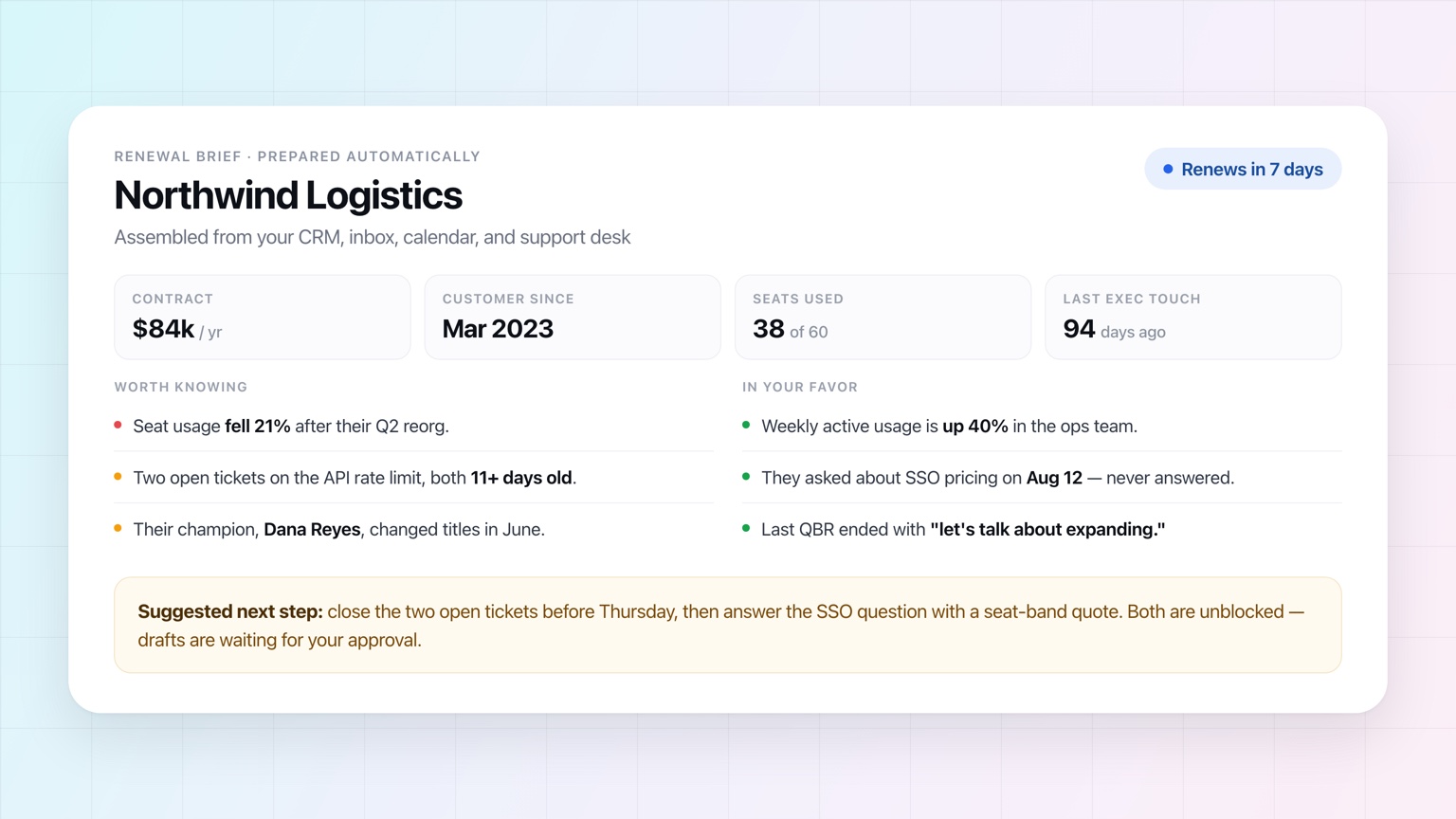
15. Prepare Customer Renewal Briefs
Before a renewal conversation, someone has to reconstruct the relationship. How long have they been a customer? What are they paying? What have they asked for? Were there support problems? Who has been involved? What happened at the last review?
That's information synthesis, which is something AI is genuinely good at.
Run it automatically several days before every renewal and the account owner gets time to act on anything concerning — while acting on it still matters.
16. Gather Information From Your Team
Managers spend a startling amount of time working as human routers.
Can everyone send me their numbers for this week?
Who hasn't updated this?
Can you get me your section by Thursday?
An assistant that can contact other people directly can collect those inputs itself, track who has responded, chase whoever hasn't, and hand you the consolidated result.
You get the finished information instead of running the collection process.
17. Monitor Important News
There is more news than anyone can follow, and almost none of it is relevant to your job.
Instead of checking the same publications and saved searches every morning, describe what would genuinely matter to you. Your assistant can watch those areas and either summarize what's relevant or stay quiet until something crosses a line you defined.
The value is in the filtering, not the summarizing. A good workflow doesn't give you more news. It gives you fewer things worth knowing.
18. Organize Incoming Information
Documents, attachments, meeting notes, customer requests, research, internal messages — it all arrives in different places, in different formats, at different times.
An assistant can pull out what's useful, classify it, rename and file it, summarize what came in, and route it to the right system or person.
This is deeply unglamorous work. That's exactly why it's worth handing off.
19. Chase Deadlines
Deadlines are cheap to create and expensive to maintain.
A recurring workflow can check what's coming up, find what's still incomplete, remind the people responsible, and escalate to you only when something looks likely to slip.
Instead of spending your week asking "are we still on track?", you hear about the parts that aren't.
20. Handle the Work Between Your Tools
Some of the biggest wins come from work that doesn't live in any single application.
A customer emails. Someone has to research a question, update a document, tell the account team in Slack, schedule a follow-up, and check back if the customer goes quiet.
Traditionally, you are the integration between those systems.
An assistant that can reach all of them can do that coordination itself — which matters more than it sounds, because real work almost never fits neatly inside one tool. It's also the reason an assistant that works where you already work beats a better chat window.
How to Decide What to Automate With AI
Don't start from what AI can do. Start from your own week.
What do you check repeatedly? Prepare repeatedly? Chase repeatedly? What do you have to hold in your head? What makes you think, someone else could obviously be doing this?
Those tend to be better candidates than the big, complicated projects people imagine handing to AI first.
Here's a useful test: could you describe the responsibility to a competent new hire in a sentence or two? If you can say "every Friday, check these projects and tell me which ones look stuck," you already have enough. You don't need to design a flowchart around it — a modern assistant can interpret the goal and make the judgment calls inside it.
Start with one responsibility. Watch how it goes. Then add another.
The goal isn't automating your whole job. It's steadily removing the parts that never really needed to be yours.
How Much Should It Do Without Asking?
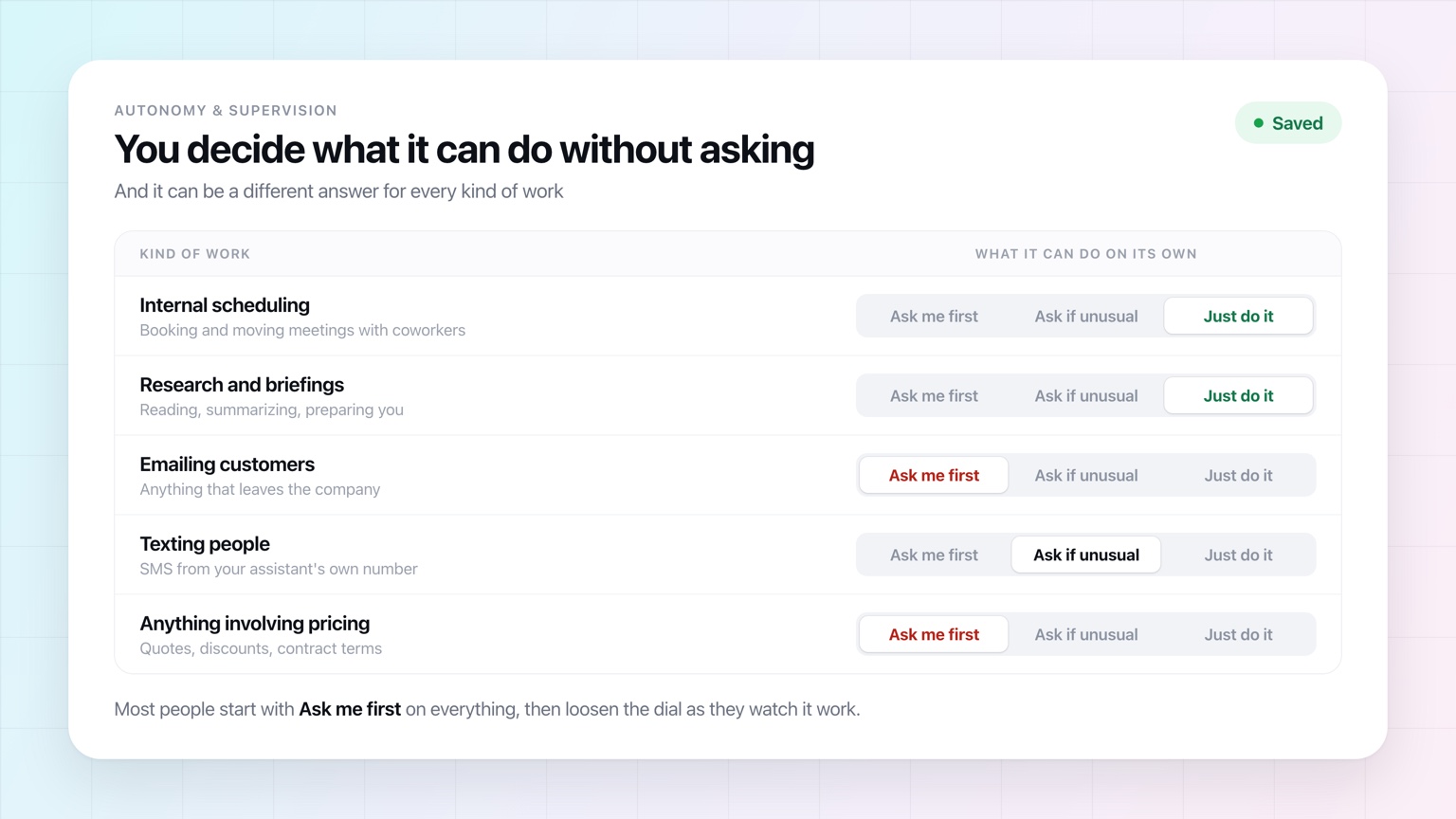
Handing over real work raises a fair question, and it's the one most people get stuck on: what is it allowed to do on its own?
That should be a setting, not a leap of faith. OpenAssistant runs anywhere along the range:
- Fully autonomous. It emails people, coordinates, and finishes the work, then tells you what it did.
- Approval on everything. Nothing leaves your account until you've read it and said yes.
- Anywhere in between. Book internal meetings freely; hold anything customer-facing for review.
And it doesn't have to be a single answer. Research and internal scheduling can run wide open while anything involving pricing waits for you.
Most people start cautious and loosen the dial as they watch real work come back correct.
Frequently Asked Questions
Which tasks should you automate with AI first?
Start with recurring work you would happily hand to a new hire — meeting prep, weekly summaries, follow-ups, chasing people for answers. Recurring tasks are the easiest to describe, the easiest to check, and the fastest to pay you back, because you describe the job once and the savings repeat every week.
What is the difference between automating a task with AI and using an AI chatbot?
A chatbot waits for you to prompt it and hands the output back to you. An automated task runs on a schedule or a trigger and finishes the job — checking your calendar, emailing the other person, updating the document — without you sitting in front of it. The difference is who starts the work and who does the last step.
Do I need technical skills to automate work with AI?
No. You are not building a flowchart or connecting nodes. You describe the responsibility in plain English — "every Monday, tell me which open projects have not been updated" — and the assistant handles the judgment inside it.
Is it safe to let AI email or text people on my behalf?
That should be a setting rather than an all-or-nothing decision. A good assistant lets you choose how much autonomy it has, and lets that answer differ by kind of work — booking internal meetings on its own, say, while holding anything customer-facing for your approval. Most people start with approval on everything and loosen it as they watch real work come back correct.
How many tasks should I automate at once?
One, to begin with. Pick a single responsibility, watch how the assistant handles it for a week, and adjust how much autonomy it gets. Automating ten things you have not verified only moves the reviewing work somewhere else.
What is the difference between AI automation and traditional workflow automation?
Traditional automation is rules: if this, then exactly that. It breaks the moment reality stops matching the rule. AI automation can handle the judgment steps — deciding whether an email needs a reply, what belongs in a briefing, whether a project is genuinely stuck — which is why it can take on work you could never have scripted.
From AI Assistance to AI Delegation
The first wave of workplace AI made individual tasks faster. An email took two minutes instead of ten. Research took 20 minutes instead of an hour. The first draft appeared instantly.
The next wave does something different: it takes the task off your list.
That's the idea behind OpenAssistant. Rather than sitting in a chat window prompting it through every step, your assistant works across your tools, has its own name, face, email address, and phone number — so you can email or text it, and it can email and text other people on your behalf — and runs recurring work on the schedule you set, with exactly as much autonomy as you're comfortable giving it.
You can still ask AI to help you do something.
Increasingly, you can just ask it to do it.
See it in the product
Pick one task. Stop doing it yourself.
OpenAssistant runs meeting prep, follow-ups, briefings, and recurring workflows in the tools you already use — on your schedule, with your approval settings.