AI Daily Agenda: Replacing the Morning Calendar Check
 Justin Canetti8 min read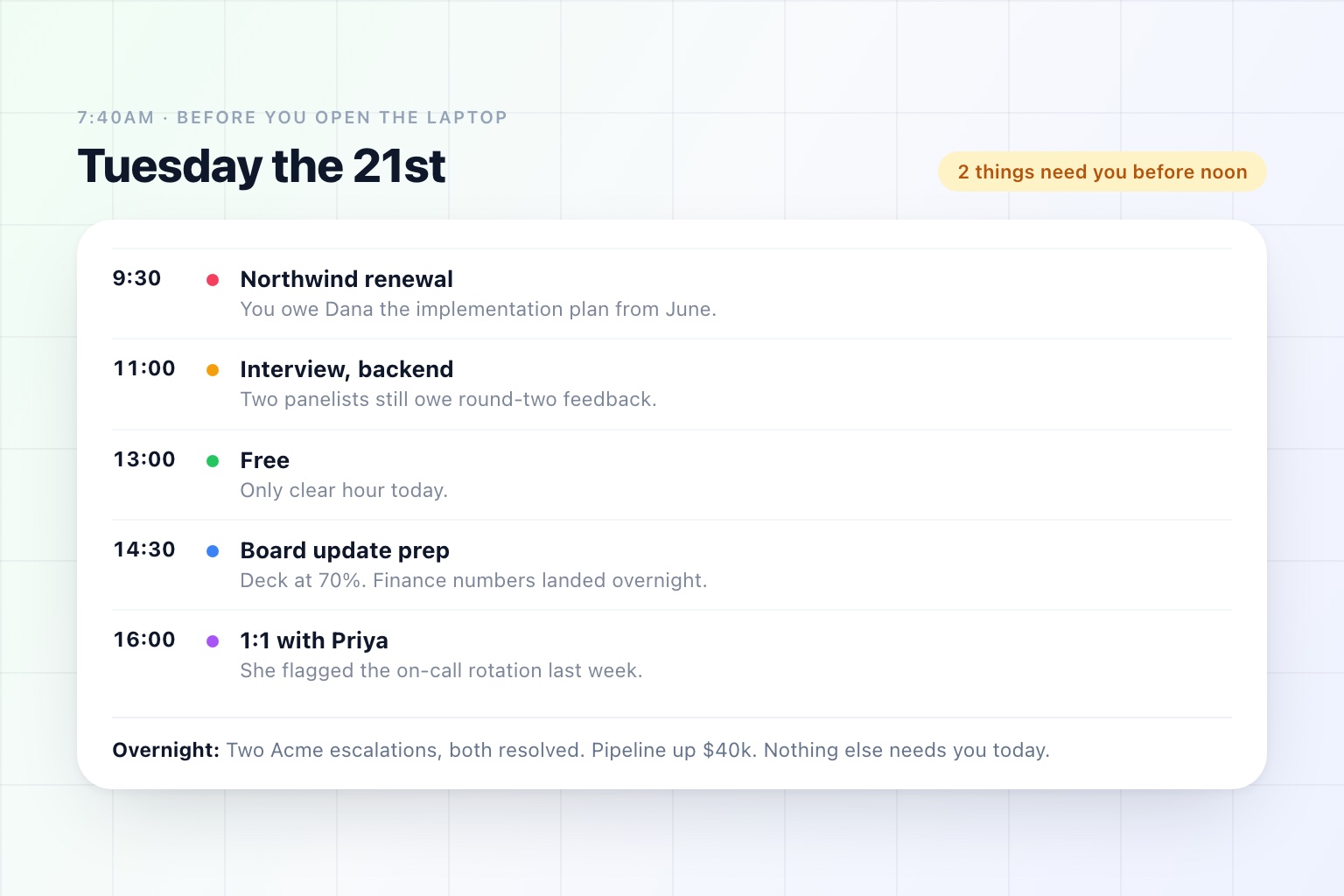
Reconstruct the first twenty minutes of your working day.
Calendar, to see what is coming. Inbox, scrolled rather than read, to check nothing has caught fire. Messages, same reason. Whatever dashboard tells you how the business did overnight. Maybe a news tab. Then back to the calendar, because you have already forgotten what the 11am was.
You do this every day. It is roughly the same twenty minutes, pulling roughly the same information out of roughly the same places, and at the end of it you do not have a plan. You have a feeling about the day, which is a different thing.
It is also, by any reasonable definition, a task. Same inputs, same steps, same output, every single morning. The only reason it has never been automated is that until recently nothing could read all five sources and work out which four facts mattered.
The Ritual Is Not About Information
Worth being honest about why the habit is so sticky: most of that twenty minutes is not information gathering. It is anxiety management.
You are not scrolling the inbox to read it. You are checking that there is nothing in there that will ruin your day, and the scroll is how you buy the reassurance. Same with the dashboard — you know roughly what the number will be; you look because not looking feels worse.
That is a genuine need. The problem is that pulling is a terrible way to meet it, because you can never prove the absence of a fire by scrolling. You just stop scrolling at some point and decide it is probably fine.
A brief that says nothing needs you before 10am does the actual job, in one line, with more authority than twenty minutes of skimming.
Four Things Wrong With Pull
You get things in arrival order, not importance order. Your inbox is sorted by when someone happened to press send. Your day is not.
You only check the sources you remember. The contract that is sitting unsigned in a system you do not open daily is invisible until it is late.
It is the same work every day. Whatever else is true about the task, this is the part that makes it a candidate for handing off. A recurring sequence with an identical shape is the easiest thing in the world to describe once and never do again.
It produces no commitments. At the end of the ritual you know what is happening. You still have not decided what you owe anyone, which is the actual content of a working day.
What a Daily Agenda Is Instead
Not a calendar view with better typography. A calendar tells you where to be. A daily agenda tells you what the day requires of you.
Concretely, one screen, first thing:
- Every meeting, in order, with where it is and who is coming
- What you owe before each one — the deck you said you would send, the answer nobody has given them yet
- What changed overnight that you would otherwise find out about at 4pm
- What is waiting on you, pulled out of the inbox and stated as a list rather than a scroll
- The numbers you would have checked anyway, so you do not open the dashboard
- The one thing that is actually at risk today
The important design choice is the ordering: by your day, not by which application the information came from. You do not care that the renewal risk came from the CRM and the unanswered question came from email. You care that both of them touch the 2pm.
Here is what one looks like in practice.
Monday 21st · 4 meetings · 2 things need you before noon
- 9:30Northwind renewal (Dana Reyes). You owe her the implementation plan from June. She has not confirmed second-region headcount.
- 11:00Interview, backend candidate. Third round. Two panelists still have not submitted feedback from round two.
- 13:00Free. Only clear hour today.
- 14:30Board update prep. Deck is at 70%; finance numbers landed overnight.
- 16:001:1 with Priya. She flagged the on-call rotation last week; nothing has changed since.
Overnight: Two support escalations from Acme, both resolved. Pipeline up $40k. Nothing else needs you today.
Six lines and you have a plan, including the uncomfortable one at the top you were going to discover at 9:29.
The Design Rules That Make It Work
Most daily digests fail, and they fail in predictable ways.
One screen or it does not get read. The instinct is to include everything, because everything might be relevant. A brief that scrolls becomes a thing you mean to read properly later.
Every line has to imply an action or a decision. "Revenue was $184k" is a fact. "Revenue was $184k, which is under plan for the third day" is a line you can do something with.
No line should be there every day. A section that always says the same thing is furniture, and your eye will learn to skip past it — along with, eventually, the line next to it that mattered.
It has to be ruthless about silence. "Nothing needs you before 10am" is the most valuable sentence a brief can contain, and the hardest for a system to say with confidence, because it requires actually having checked.
It has to arrive before you open the laptop. The whole point is to replace the ritual. A brief you read after you have already checked your inbox is a summary of things you know.
Push, and the Channel Question
A daily agenda is a push, and that is most of the value. You stop deciding when to go and look.
Which means the channel matters more than it sounds like it should. Email is the default and it is fine, if you are at a desk. If your mornings start on a train or in a car, it needs to be a text. Some people want it in the app and nowhere else, because email first thing is how the day gets hijacked.
The right answer is whichever one you will actually read at 7:40am, and it is worth being honest with yourself about that rather than picking the one that sounds most professional.
Timing deserves the same care. A brief at 6am is stale by 9. A brief at 9 arrives after you have already done the ritual by hand. Somewhere around when you first pick up your phone is the slot, and it is a setting worth adjusting twice before you decide it does not work.
What to Leave Off
The failure mode of any automated brief is scope creep, because adding a source is easy and removing one feels like losing information.
Some things that usually should not be there:
Full metrics dashboards. One number that moved, with why. Not the board deck.
Every email subject line. If the brief reproduces your inbox, you have built a second inbox.
Industry news, ungated. "Relevant news about companies you are meeting today" is useful. A general feed is a way to spend eleven minutes not working.
Anything you have never once acted on. Two weeks in, look at the brief and delete every line you have never done anything about. That is the whole optimization.
The End-of-Day Version
Less common and arguably better value: the same idea at 5pm.
What did you commit to today that has not happened. Who is waiting on you overnight. What moves tomorrow. It takes thirty seconds to read and it is the difference between a Friday review that finds four dropped threads and one that finds none.
The morning brief tells you what the day asks of you. The evening one closes the loop, and between them there is not much room for something to quietly go missing.
Why This Is the Easiest Thing to Hand Off
Of all the work you could delegate to an assistant, the daily agenda is the one with the least downside and the clearest shape.
It is recurring, so you describe it once. It is read-only, so nothing can go wrong in front of a customer while you are learning to trust it. The output is a page of text you can immediately judge — either it told you something useful or it did not. And it is reversible: stop reading it and you are back where you started, having lost nothing.
That makes it a good first thing to delegate, which is not a small consideration. Most people do not have a philosophical objection to handing work to an assistant. They have a reasonable reluctance to start with something that matters. A morning brief lets you find out whether the thing is any good before you let it email anyone.
We went through the fuller version of that argument — what to hand over, in what order — in How to Automate Repetitive Tasks With AI, and covered what belongs in a per-meeting brief in AI Meeting Prep: What a Good Pre-Meeting Brief Actually Contains.
See it in the product
Start tomorrow with a plan, not a scroll
A daily agenda built exactly the way you want it, delivered by email, text, or in the app.
Free plan · No credit card required