How to Automate Repetitive Tasks With AI (No Code, No Flowcharts)
 Justin Canetti10 min read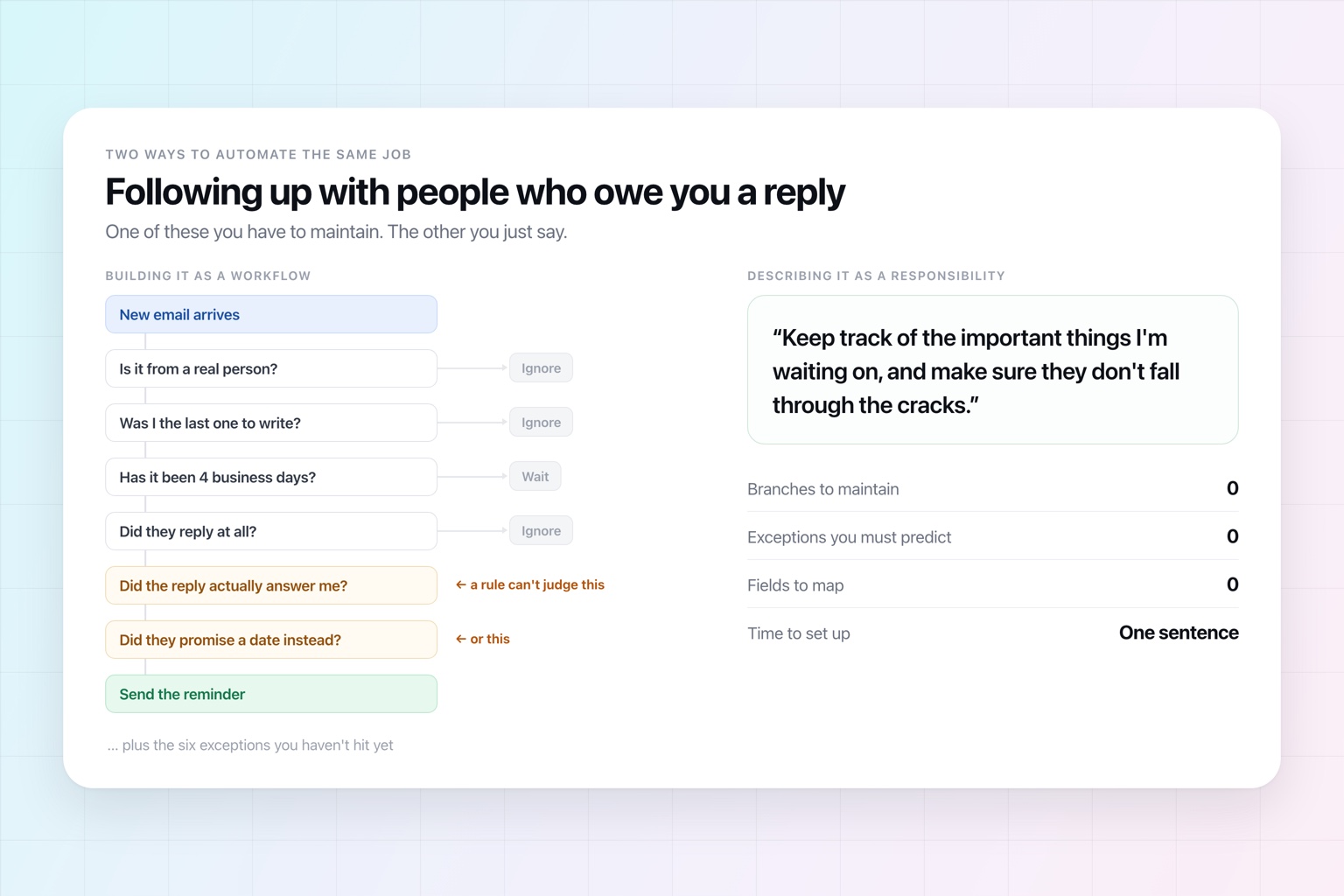
For years, automating work meant learning to think like software.
You picked a trigger. You chose an action. You mapped fields between applications. Then you added branches for the exceptions, filters for the things you didn't want, and another step to handle the output of the previous step.
That works extremely well when a process is predictable.
The trouble is that a lot of work isn't.
What a Flowchart Can't Hold
Say you want to automate following up with people who owe you a response.
Build that as a workflow and the questions start immediately. Which emails count? How long do you wait? What if the person replied but didn't actually answer the question? What if they said they'd get back to you next week? What if the message was informational and never needed a response at all?
Every one of those is a branch. You have to think of it in advance, encode it, and maintain it. And the list is never finished — you discover the tenth exception the first time it costs you a deal.
Notice that you'd never do this to a person. You don't hand a new assistant a diagram with seventeen nodes and six conditional branches. You give them a responsibility:
Keep track of the important things I'm waiting on, and make sure they don't fall through the cracks.
That single sentence covers every branch above, including the ones you haven't thought of, because the person filling the role brings judgment to it.
That's the actual difference with AI automation. You're no longer specifying a path through a process. You're describing an outcome and letting something with judgment work out the route.
No code — but also, and more importantly, no flowchart.
When a Flowchart Is Still the Right Answer
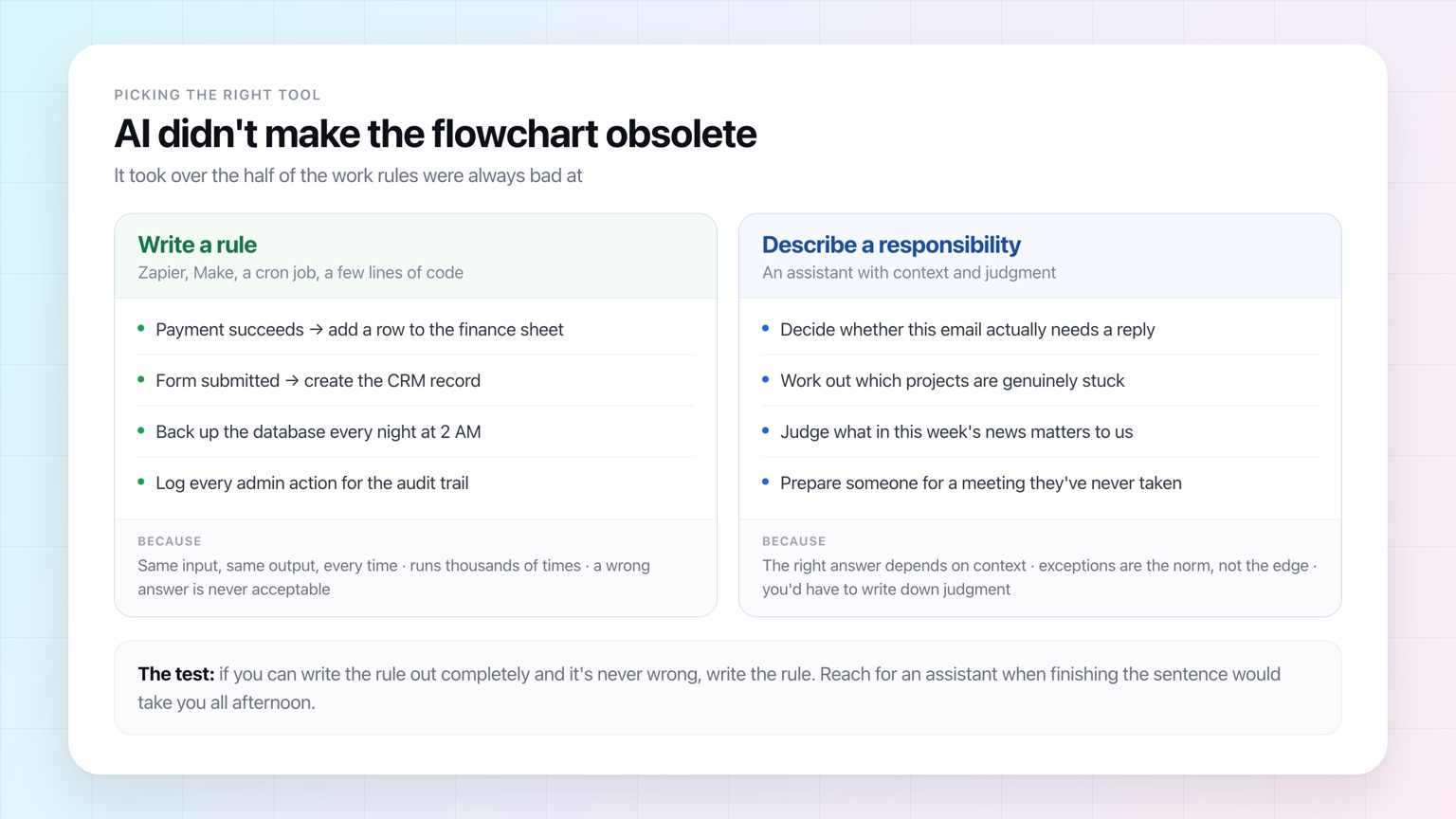
Before going further, the honest caveat: rule-based automation didn't become obsolete. It got a clearer job.
Keep using rules when the rule is short, complete, and never wrong:
- A payment succeeds, so a row lands in the finance sheet.
- A form is submitted, so a CRM record is created.
- The database backs up at 2 AM.
- Every admin action gets written to an audit log.
These run thousands of times, produce the same output from the same input, and can't tolerate a judgment call. Rules are cheaper, faster, and far easier to verify. Using AI there would be worse in every dimension.
AI earns its place on the other half of the work — the half rules were always bad at. Deciding whether an email actually needs a reply. Working out which projects are genuinely stuck rather than merely quiet. Judging what in this week's competitor news matters to you.
A reasonable test: if you can write the rule out completely and it's never wrong, write the rule. If finishing that sentence would take you all afternoon, you're describing a responsibility, not a rule.
Most people's best move isn't replacing their existing automations. It's noticing which ones keep growing new branches — and handing that part over instead.
Start With the Work, Not the AI
The easiest way to find something worth automating is not to browse a list of AI features.
Look at your week.
Some of what you do genuinely requires your judgment: an important hire, how to price something, a difficult negotiation, what to build next.
Then there's everything that became your job by accident. You check whether someone responded. You prepare for tomorrow's meetings. You collect weekly updates. You reorganize what someone sent you. You open the same dashboard. You chase a deadline. You research the same kind of company before every sales call.
These tasks survive precisely because each one is small. Nobody redesigns a business process to eliminate seven minutes.
But seven minutes, several hundred times a year, is a real part of your job.
Here's how to hand one of them over:
- Find something you do repeatedly
- Describe the outcome, not every click
- Give it the context it needs
- Decide what should start the work
- Decide how much it can do without asking
- Tell it what good looks like
- Test it before you forget about it
Step 1: Find Something You Do Repeatedly
Repetition is the clearest signal that something is worth automating.
Don't restrict yourself to things that happen on a schedule. Some repetition is calendar-based — every Monday, review our open projects; every Friday, summarize competitor activity. Other repetition is event-based — whenever I have an external meeting, prepare me for it; whenever a new lead comes in, research the company.
The timing varies. The responsibility doesn't.
For one week, notice the sentences you say to yourself that start with "I need to remember to…" Those are your candidates. If you want a longer list to compare against, we wrote up twenty tasks worth automating separately.
Step 2: Describe the Outcome, Not Every Click
This is where AI automation stops resembling the old kind.
Suppose you want a briefing before sales meetings. You could try to specify each step:
Check my calendar for meetings. Determine whether the attendee is external. Search their name. Search the company. Look in my email for previous messages. Find the most recent thread. Summarize it. Then…
That's flowchart thinking, and it's not how you'd explain the job to a person. You'd say:
Thirty minutes before every prospect meeting, prepare me on the people, the company, our previous conversations, and anything I should be ready to discuss.
That's the better instruction, because it specifies the outcome and leaves the route open.
Which matters, because reality produces exceptions. Maybe there's no email history. Maybe the person changed companies since you last spoke. Maybe the meeting turns out to be with an existing customer, not a prospect. A rigid workflow needs you to have predicted each of those. An assistant can reason about them as they come up.
Step 3: Give It the Context It Needs
AI can't automate work it can't see.
Meeting prep needs your calendar. Email triage needs your inbox. Reviewing company documents needs access to wherever those documents live.
This is the real gap between AI that knows things and AI that knows your work. A general model can explain how to prepare for a sales call. An assistant connected to your systems can tell you that tomorrow's prospect emailed you about SSO in June, that your last conversation was three weeks ago, and that they asked for pricing you never sent.
Same model. Completely different usefulness.
When deciding what to connect, work backwards from the responsibility: what would a competent assistant need to do this job properly? Give it that, and nothing it doesn't need — a good habit generally, and one of the things worth checking when you're deciding whether a tool has earned that access.
Step 4: Decide What Should Start the Work
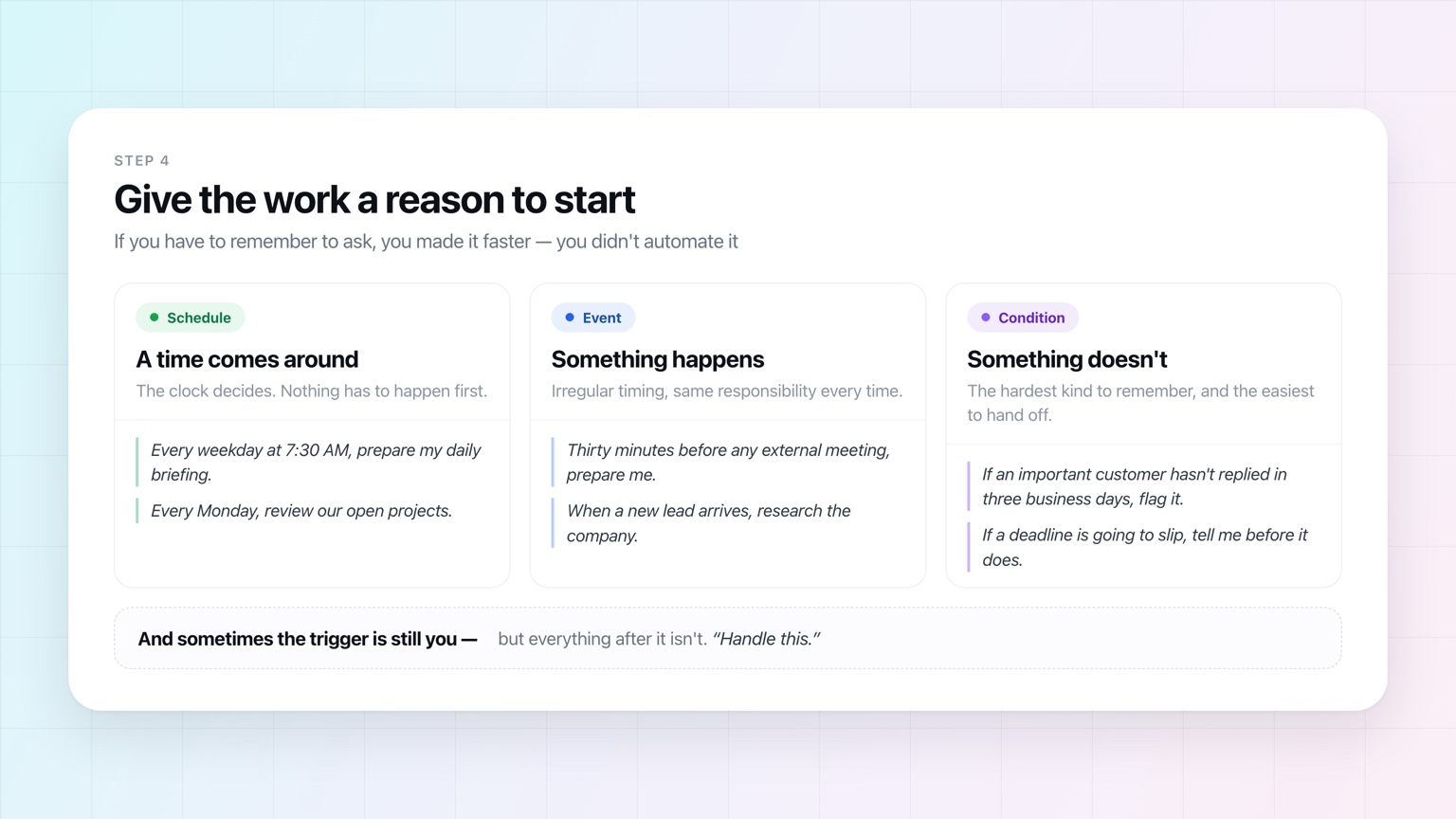
If you have to remember to ask every time, you've made the task faster. You haven't automated it.
Work needs a reason to begin. Usually one of three:
- A schedule. Every weekday at 7:30 AM, prepare my daily briefing.
- An event. Thirty minutes before an external meeting, prepare me.
- A condition. If an important customer hasn't responded in three business days, flag it.
That third kind is worth dwelling on, because it's the one people are worst at. Remembering that something didn't happen requires holding an open loop in your head indefinitely. It's the easiest thing to hand off and the last thing most people think to.
And sometimes the trigger is still you — but everything after it isn't. Handle this.
Step 5: Decide How Much It Can Do Without Asking
Automating work doesn't mean surrendering oversight. Summarizing your inbox and emailing your largest customer are different acts, and it's reasonable to treat them differently.
Think of autonomy as a dial rather than a switch. At one end the assistant prepares everything and you approve it. In the middle, routine work runs on its own while anything customer-facing waits. At the other end it owns the responsibility outright and reports back.
You don't have to start at the far end. Start with more oversight than you think you'll need, watch what decisions get made, and remove approvals once they stop earning their place. That isn't different from delegating to a person. (We went deeper on where to set the dial in an earlier post.)
Step 6: Tell It What Good Looks Like
"Summarize my email" is an instruction. "Every morning, tell me which emails actually need my attention, why they matter, and what you'd do next" is a job description.
This matters most for recurring work, because a bad recurring workflow creates recurring annoyance. A daily briefing with thirty items goes unread. A competitor monitor that reports every blog post gets ignored. A project review where everything is "in progress" tells you nothing.
So say what you don't care about, too:
Don't summarize every project. Tell me only about the ones that look stuck, have overdue work, are approaching a deadline, or haven't been touched recently.
Now the workflow has an actual job: find the exceptions. That's much closer to delegation that saves time.
Step 7: Test It Before You Forget About It
The point of automation is to stop thinking about the task. Just not on day one.
Let it run a few times and look at what it did. Was the briefing useful? Did it pick the right meetings? Did it understand what "important" means in your world?
When it gets something wrong, don't conclude the task can't be automated — ask why. Maybe the instruction was vague. Maybe it was missing context. Maybe an unusual case needs a rule. Or maybe you've found a decision that really should stay with you.
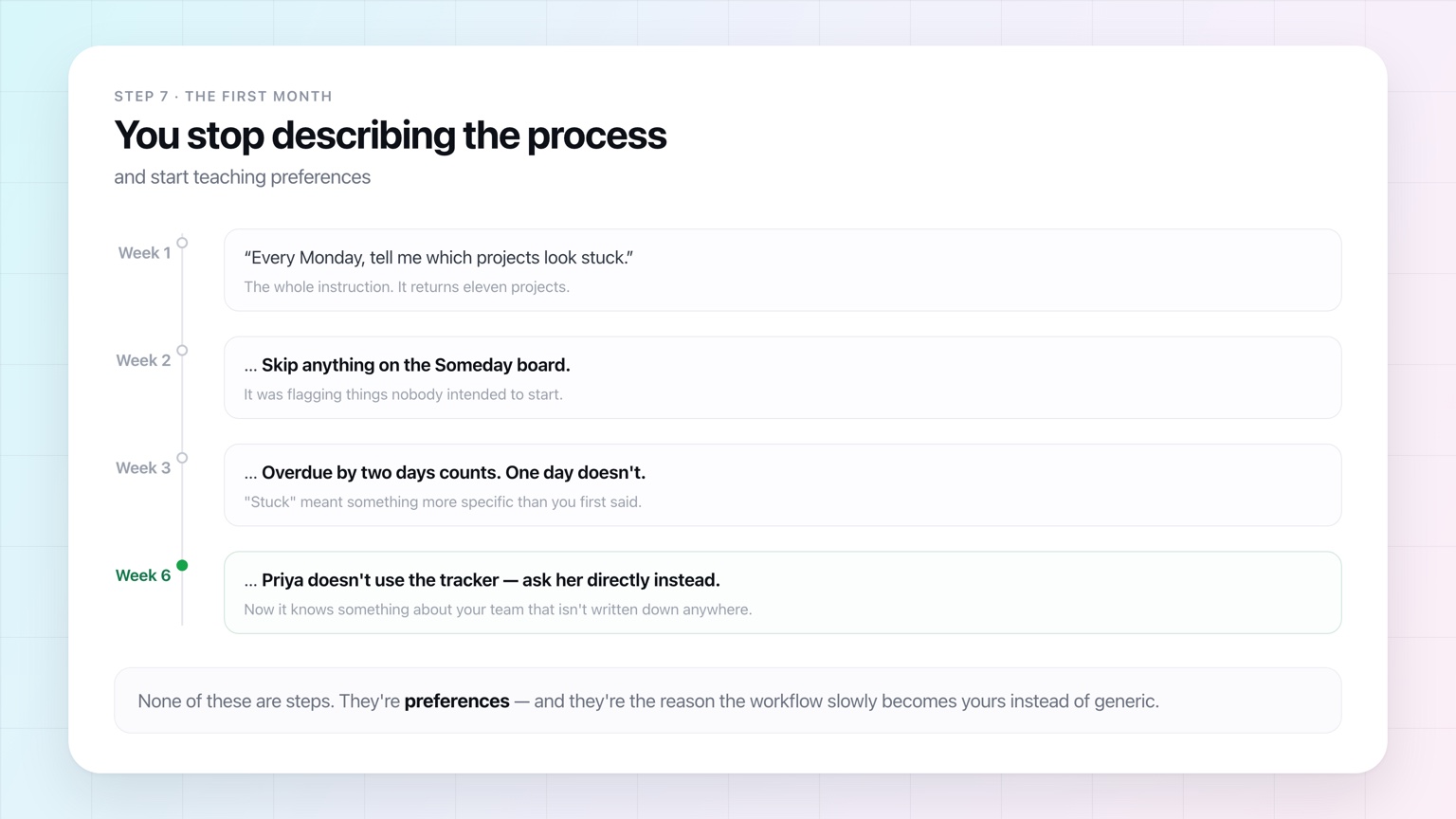
Over the first month, the instructions change character. They stop describing the process and start recording preferences: skip internal meetings; always flag these customers; keep it under five minutes; never send anything external without asking.
That's the point where the workflow stops being generic and starts being yours.
Rewriting a Prompt as a Responsibility
The pattern, applied to three jobs most people still do by hand.
Meeting preparation
Instead of:
Research Acme before my 2 PM meeting.
Try:
Before every external meeting, review the attendees, the company, our previous conversations, and any relevant documents. Send me a short briefing 30 minutes ahead with what I should know and what's worth asking.
The first is a prompt you have to remember. The second is a standing responsibility.
Follow-ups
Instead of:
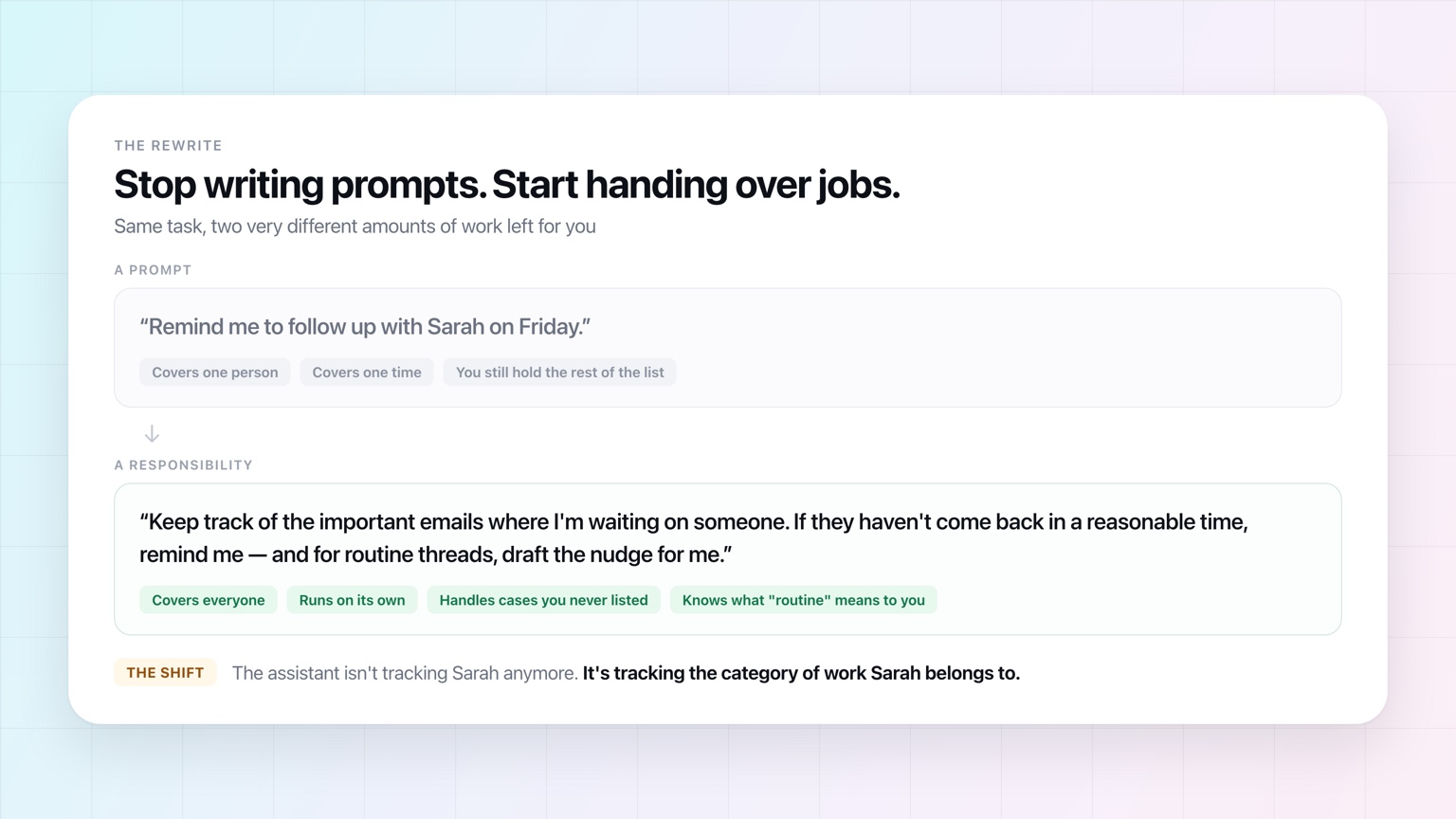
Remind me to follow up with Sarah on Friday.
Try:
Keep track of the important emails where I'm waiting on someone. If they haven't come back in a reasonable time, remind me — and for routine threads, draft the nudge.
The assistant isn't tracking Sarah anymore. It's tracking the category of work Sarah belongs to.
Weekly project reviews
Instead of opening your project tracker every Monday and reading every card:
Every Monday, review our active projects and tell me which look stuck, have overdue work, are approaching a deadline, or haven't been updated. Don't tell me about the healthy ones.
This one is the clearest example of the whole argument. You can't write "looks stuck" as a filter — it depends on the project, the team, and what normal looks like there. The workflow isn't rebuilding your dashboard. It's deciding what deserves your attention.
What Not to Automate
The fact that AI can do something doesn't mean it should do it without you.
Be more careful when a decision is hard to reverse, involves meaningful money, affects someone's employment, carries legal consequences, exposes sensitive information, or sits inside a relationship where your personal judgment is the point.
Even then, you can usually automate the preparation without automating the decision. An assistant can assemble everything you need before a hiring decision without making it. It can build the analysis for a major purchase without authorizing it. It can draft the difficult customer reply without sending it.
The goal was never maximum autonomy. The goal is minimum unnecessary work.
Frequently Asked Questions
Do you need to know how to code to automate tasks with AI?
No — and increasingly you don't need to build a workflow either. Traditional no-code tools removed the code but kept the engineering: you still chose a trigger, mapped fields, and added a branch for every exception. With an AI assistant you describe the responsibility in plain language, connect the tools it needs, and decide when it should run. The judgment that used to live in your branches lives in the assistant instead.
What is the difference between AI automation and tools like Zapier or Make?
Rule-based tools execute a path you defined in advance, exactly the same way every time. That's a strength when the process is predictable and a problem when it isn't, because every exception becomes another branch you have to anticipate and maintain. AI automation works from a described outcome rather than a defined path, so it can handle situations you never listed — deciding whether a reply actually answered your question, or whether a project is genuinely stuck.
When should you use traditional automation instead of AI?
When the rule is short, complete, and never wrong. Moving a payment record into a finance sheet, creating a CRM row from a form, running a nightly backup, writing an audit log — these are high-volume, deterministic tasks where variation is a bug rather than a feature. A rule is cheaper, faster, and easier to verify. Reach for an assistant when writing the rule out completely would take you all afternoon.
How do you write a good instruction for a recurring AI workflow?
State the outcome, not the steps, and be specific about what you don't want. "Summarize my email" is an instruction; "every morning, tell me which emails need my attention, why they matter, and what you'd do next — skip newsletters and anything internal" is a job description. Exclusions matter as much as inclusions, because a recurring workflow that reports everything becomes a recurring workflow you stop reading.
Can AI automation replace the workflows I already have?
Some of them, but the useful move is usually to divide rather than replace. Leave the deterministic plumbing where it is and hand over the parts that were always awkward to express as rules — the filters that never quite worked, the branches you keep adding, the steps that end in someone manually deciding something. Those are the places where a described responsibility outperforms a defined path.
What if the AI does something you didn't want?
That's what supervision settings are for, and it's why you start a new workflow with more oversight than you think you need. Have it prepare work for your approval first, watch several runs, and correct what it gets wrong. Most early mistakes trace back to a vague instruction or missing context rather than to a task that can't be automated — and the corrections you make become the workflow's standing preferences.
AI Automation Doesn't Have to Look Like Automation
This might be the part that matters most.
Traditional automation made us think in workflows because computers required explicit workflows. We translated our work into triggers, actions, branches, filters, fields, and rules — and we got so used to it that the translation started to feel like the job.
AI lets us move back toward the way people actually delegate.
You describe the responsibility. You connect the tools. You say when it should happen. You decide what needs your approval. The assistant handles the steps in between, including the ones you'd never have thought to write down.
Start With One Thing You'd Happily Never Do Again
People tend to think about this too ambitiously — automating a whole department, or building some elaborate autonomous agent that runs a core business process.
Start smaller. Think about tomorrow.
What's one thing you'll do tomorrow that you've already done a hundred times? Prepare for a meeting. Check whether someone replied. Scan your inbox for the thing that matters. Open the same five tabs. Ask three people for an update.
Start with that. Hand it over with whatever supervision makes you comfortable, watch it work, sharpen the instructions, and give it more once it's earned it.
Do that enough times and AI stops being a tool you remember to use. It becomes a layer of work that happens without you.
That's what we're building OpenAssistant to be. It works across your calendar, email, files, and connected tools; it has its own name, face, email address, and phone number, so you can text or email it and it can contact other people on your behalf; it runs recurring workflows on the schedule you set; and you decide how much authority it has at every step.
The goal isn't to automate everything. It's to look at the work filling your week and start asking a more useful question:
Why am I still doing this myself?
See it in the product
Describe the job. Skip the flowchart.
Tell OpenAssistant what you want handled and when. It works out the steps, across the tools you already use.