7 Best AI Email Assistants for 2026
 Justin Canetti11 min read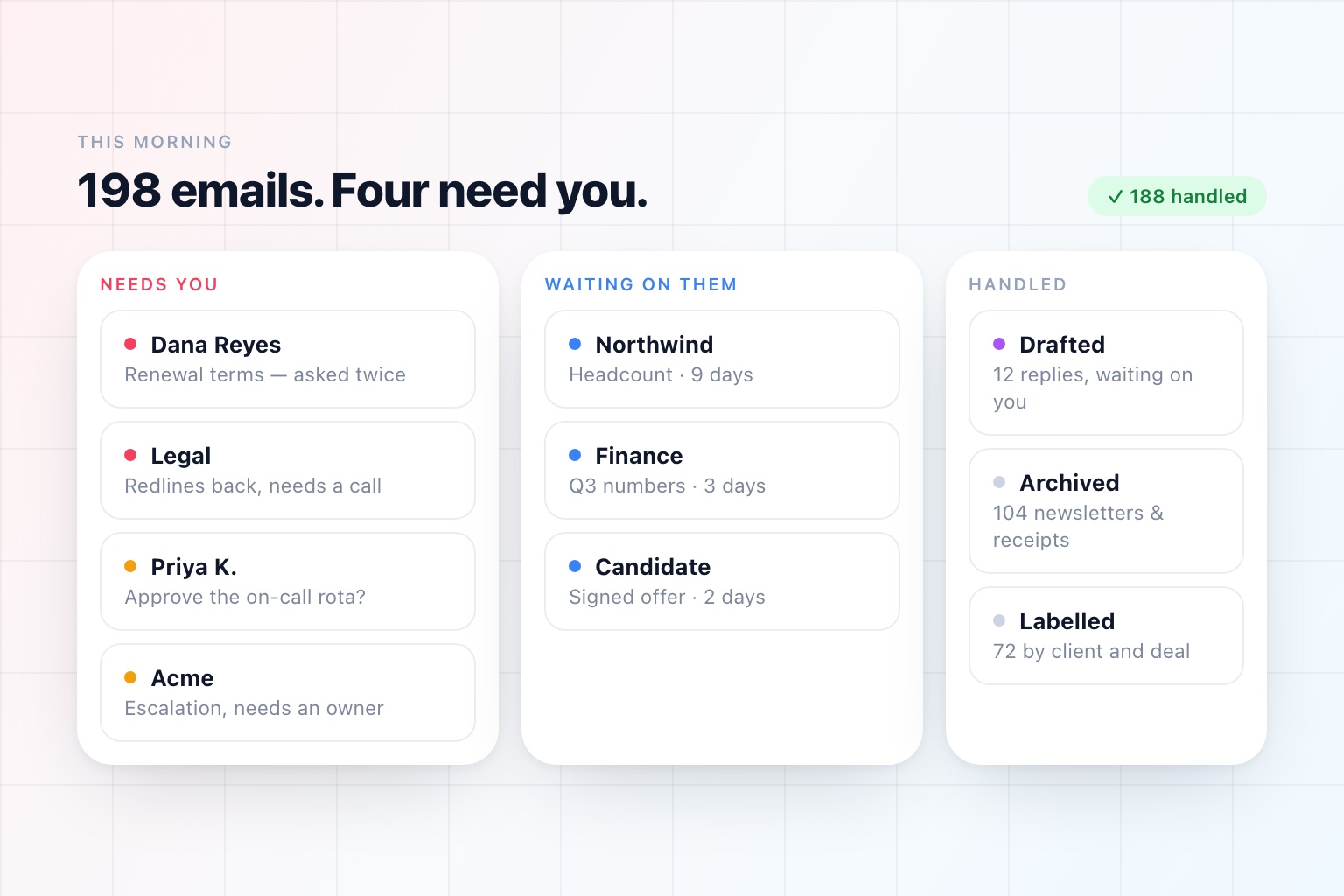
"AI email assistant" now describes at least three different products, and the reviews that rank them against each other are comparing things that do not do the same job.
It is worth separating them before you spend anything:
Faster email clients. A better place to read and write mail, with AI folded in — drafting, summaries, search. You are still processing the inbox; you are just quicker at it.
Triage layers. They sit on top of Gmail or Outlook and change what the inbox looks like. Sorting, labelling, prioritising, sometimes drafting. You keep your client and your habits.
Assistants. They do not improve the inbox; they take work out of it. Answer routine mail, chase the threads that went quiet, tell you the four things that need you, and act while you are somewhere else.
Most "best AI email assistant" lists mix all three and rank them by feature count. Here they are grouped by what they are actually for.
AI Email Assistants at a Glance
| Tool | What it is | Best for |
|---|---|---|
| OpenAssistant | Assistant that works your inbox | Handing email off, including the replies and the follow-ups |
| Shortwave | Email client (Gmail) | AI search and plain-English rules over a Gmail account |
| Fyxer | Layer on Gmail or Outlook | Drafts and labelling without changing email clients |
| SaneBox | Layer on any inbox | Pure triage, no new app, works with almost any provider |
| Gemini in Gmail | Built into Workspace | Summarizing and drafting where you already are, at no extra cost |
| Copilot in Outlook | Built into Microsoft 365 | The same, for Outlook-first organizations |
| Missive | Shared team inbox | Inboxes several people answer together |
Capability details reflect each product's public documentation as of September 2026.
How to Choose Before You Read the List
Four questions settle most of this.
Do you want to be faster at email, or do less of it? This is the fork. Everything else is detail. A faster client makes a two-hour inbox into a one-hour inbox. An assistant makes it into fifteen minutes of decisions.
Will you change email clients? Some of the best tools here are clients, which means new keyboard shortcuts, new mobile app, and a migration for everyone you roll it out to. Others leave Gmail and Outlook exactly as they are.
Are you Gmail, Outlook, or both? Several strong options are Gmail-only. If your company is on Microsoft 365, that removes them from the list before you start.
Should it ever send anything on its own? Nearly every tool in this category drafts and waits. Very few will actually answer a message for you, and whether you want that is a real preference, not a maturity level. If you do want it, the control you should look for is granularity: which kinds of mail, under what conditions, with how long a window to intervene.
1. OpenAssistant — Best for Handing Email Off Entirely
OpenAssistant is the assistant category rather than the client category. It is an AI email assistant that connects to Gmail or Outlook and works the inbox as a person would.
It triages what arrives by who sent it and what it is about, drafts replies in your voice, and leaves them waiting for one click. It archives the newsletters and receipts and stops asking about them. It applies your labels by client, project, or deal. It flags the threads you never answered and the questions you left hanging, which is the failure that actually costs money.
Then it does the two things a client cannot.
It tells you what matters instead of everything. A digest on your schedule — what needs you, what is waiting on someone else, what is already done — plus a text or a notification when something genuinely cannot wait. Two hundred emails do not produce two hundred interruptions.
It answers mail, if you let it. Routine messages can be handled outright, as itself or as you. That is a setting, configured per kind of work: hold everything for approval, hold a draft for ten minutes so you can step in before it sends, or let it run. Internal scheduling can be fully autonomous while anything touching a customer waits for you.
It is also the same assistant that handles your calendar, your pre-call briefs, and the recurring work you describe in plain English, which matters because inbox work rarely stops at the inbox. "Reply to Dana and get it on the calendar" is one instruction, not two products.
Best for: People whose inbox is a job rather than a task.
Worth knowing: It is not an email client. You keep Gmail or Outlook and the assistant works alongside it.
2. Shortwave — Best AI-Native Client for Gmail
Shortwave rebuilt the Gmail experience around AI rather than bolting it on. The standouts are AI search that answers questions across your mail and attachments rather than matching keywords, drafting that learns your voice from what you have actually sent, tl;dr summaries at the top of long threads, and custom filters you write in plain English instead of building rule by rule.
The plain-English filters in particular are the most under-appreciated feature in this category.
Best for: Gmail users who want the AI-native client and will change apps to get it.
Worth knowing: Gmail-centric. If you are on Outlook, this is not your list entry.
3. Fyxer — Best Drafting Layer for Gmail and Outlook
Fyxer works on top of the inbox you already have. It labels incoming mail and lifts the ones that matter to the top, writes reply drafts you review before sending, and takes notes on your calls with follow-ups attached. It supports both Gmail and Outlook, which narrows the field considerably on its own.
Notably, it drafts and waits — it does not send on its own. For a lot of people that is exactly the right setting, and it is the reason Fyxer is an easy tool to introduce to a nervous team.
Best for: Professionals who want drafts and order without changing clients.
Worth knowing: Everything still passes through you. That is the design, and it is also the ceiling.
4. SaneBox — Best Pure Triage
SaneBox is the oldest idea here and still the most quietly effective. It does not write anything, does not have a chat box, and does not ask you to switch apps. It learns what you actually read and moves the rest out of the way, into folders you check on your own schedule, and it works with basically any provider.
If your problem is volume rather than composition, this solves the whole problem without changing anything else about how you work.
Best for: Anyone drowning in mail who does not want a new app.
Worth knowing: Sorting only. It will not draft, reply, or follow up.
5. Gemini in Gmail — Best Free Option for Workspace
If your company is on Google Workspace, you already have AI in Gmail: thread summaries, drafting help, and search that understands a question. It costs nothing extra on the eligible plans, requires no security review, and needs no rollout.
It does not triage, does not act, and does not remember what you care about across weeks. But the honest comparison for most people is not against a paid tool — it is against nothing, and against nothing it does well.
Best for: Workspace organizations that want a baseline before buying anything.
Worth knowing: Availability depends on your Workspace edition.
6. Microsoft Copilot in Outlook — Best Free-ish Option for Microsoft 365
The same argument on the other side of the fence. Copilot summarizes long threads, drafts replies, coaches your tone, and pulls context from your documents and meetings, and it inherits your existing Microsoft compliance posture — which, in a large enterprise, is most of the battle.
Best for: Outlook-first organizations, particularly regulated ones.
Worth knowing: Licensing is its own conversation, and capabilities vary by plan.
7. Missive — Best for Shared Inboxes
Missive is aimed at a different problem: mail that belongs to a team rather than a person. Support, sales, ops, anything@company.com. It gives you shared inboxes with internal chat alongside the thread, assignment, and drafts several people can work on together, with AI for summarizing and composing.
If two people have ever replied to the same customer twenty minutes apart, this is the category you want, and personal-inbox tools will not help.
Best for: Teams answering a shared address.
Worth knowing: For a personal inbox it is more machinery than you need.
The Honest Summary
- You love email and want a smarter inbox: Shortwave, if you are on Gmail
- You want the inbox sorted and nothing else: SaneBox
- You want drafts without changing clients: Fyxer
- You want to spend nothing and are on Workspace or Microsoft 365: Gemini in Gmail, or Copilot in Outlook
- Your inbox is answered by a team: Missive
- You want the inbox to stop being your job: OpenAssistant
One thing worth noticing about that list: only the last option changes the number of messages you personally handle. Everything else changes how pleasant handling them is.
That is not a criticism. For plenty of people, faster is the whole ask, and a beautiful client they enjoy using beats an assistant they never configure. But if you have tried three of these and the inbox still owns your mornings, the pattern is telling you something about which category you are shopping in.
What Changed in 2026
Two things, and both are underreported.
Drafting stopped being the differentiator. Every tool on this list writes a decent reply now. When a feature is universal it stops being a reason to choose. The questions that separate products now are what happens to a message before you see it and what happens to a thread after you stop thinking about it.
Acting became the real dividing line. A tool that drafts is a writing aid. A tool that can answer routine mail, chase a quiet thread, and escalate the one thing that needs you is doing a different job — and the interesting engineering is no longer in the writing, it is in the permissions. The right question to ask a vendor in 2026 is not "how good are the drafts," it is "what will it do without asking me, and can I change that per kind of mail?"
We wrote about the wider version of that shift in How Businesses Can Use AI Beyond ChatGPT in 2026, and made the case against inbox zero as a goal in AI Email Management: Inbox Zero Was Never the Point.
Frequently Asked Questions
What is the best AI email assistant in 2026?
There is no single answer because the category contains three different products. If you want to be faster at email you still process yourself, an AI-native client like Shortwave is the pick. If you want the inbox sorted with nothing else changing, SaneBox. If you want the inbox to stop being your job — routine mail answered, threads chased, one digest instead of two hundred interruptions — you want an assistant rather than a client.
What is the difference between an AI email client and an AI email assistant?
A client is a better place to do email: faster, with drafting and search folded in. An assistant takes work out of the inbox instead of improving it — answering routine mail, chasing threads that went quiet, surfacing only what needs a decision from you. A client changes how pleasant the work is. An assistant changes how much of it reaches you.
Is there a free AI email assistant?
If your company is on Google Workspace or Microsoft 365, Gemini in Gmail and Copilot in Outlook are included on eligible plans and do summarizing, drafting, and question-style search. They do not triage or act, but they cost nothing extra and deserve an honest fortnight before you buy anything.
Which AI email assistants work with Outlook?
Fewer than you would expect — several of the best-known tools are Gmail-only. Fyxer supports both Gmail and Outlook, Copilot is native to Outlook, and assistants that connect to your mailbox rather than replacing your client generally support both. If you are on Microsoft 365, apply that filter before comparing anything else.
Can an AI email assistant reply to messages for me?
Some can, though most only draft and wait. Where a tool can reply outright, the thing to check is how precisely you can control it: which categories it may answer, how long it holds a draft before sending, and what always comes to you. That granularity matters more than the quality of the writing, which is now good across the whole category.
See it in the product
Give your inbox to someone else
Triage, drafted replies, a digest of what actually needs you, and flags on the threads you dropped.
Free plan · No credit card required