7 Best AI Meeting Assistants for 2026: Prep, Notes, and Follow-Up
 Justin Canetti10 min read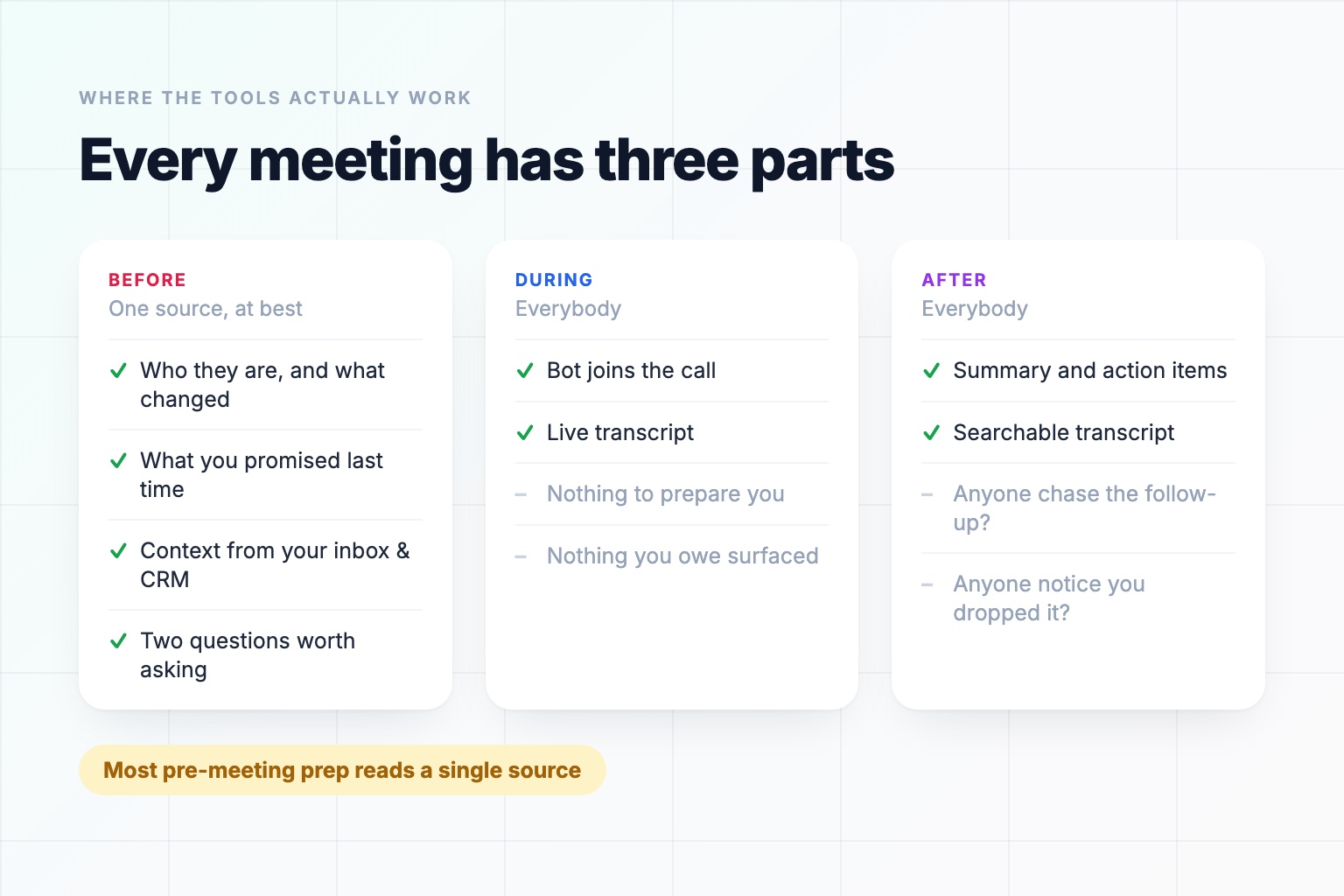
A meeting has three phases, and the AI tooling for them is wildly uneven.
Before — working out who you are meeting, what happened last time, what you owe them, and what you want out of the next thirty minutes.
During — being present, and capturing what is said.
After — the summary, the action items, the follow-up nobody sends.
Almost every product in the "AI meeting assistant" category was built for during and after. That is not a conspiracy; it is where the easy data is. A recording is a file. Everything a tool needs is inside it, and the work is transcription and summarization, both of which got very good very quickly.
Before is harder, because the information is not in one place. It is spread across the public record, your inbox, your CRM, your notes from four months ago, and your own head. Which is why the prep that has since appeared reads one of those places rather than all of them, and why it is still the phase where a tool changes the outcome rather than documenting it.
This comparison is organized by phase, because that is the distinction that actually matters when you are choosing.
AI Meeting Assistants Compared by Phase
| Tool | Before | During | After |
|---|---|---|---|
| OpenAssistant | Full brief across everything you connect: email, notes, CRM, calendar | Not a notetaker | Follow-ups and commitments tracked in your inbox |
| Granola | Brief before external meetings (Business plans) | No bot — uses your computer audio | Enhanced notes and meeting memory |
| Fathom | No | Visible bot joins the call | Fast summaries and action items |
| Otter | CRM pre-call brief in the Sales Agent | Bot joins, live transcript | Transcript search and chat over past calls |
| Fireflies | Meeting Prep email about an hour ahead | Bot joins the call | Transcripts, search across meetings, CRM sync |
| Read AI | Pre-meeting brief | Bot joins, engagement signals | Summaries plus meeting analytics |
| Gemini / Copilot notes | No | Built into Meet or Teams | Notes in the suite you already pay for |
Capability details reflect each product's own documentation and help center, checked in September 2026. This category changes quickly — verify before you buy.
1. OpenAssistant — Best for the Before
OpenAssistant is the odd one out on this list, and deliberately so: it is not a notetaker. It works the phase the others treat as an afterthought, and it is the one that reads across everything you connect rather than the one source it already holds.
Before a call, this AI meeting prep researches who you are meeting — who they are, what they have done, their company, recent news, their LinkedIn history — and then adds the part public research cannot give you, reading across whatever you have connected: what this person last asked for, what you promised them, which thread went quiet, and what your CRM and past meeting notes say. It arrives as a brief, by email, text, or in the app, on the schedule you choose.
You control the scope: external calls only, every meeting, or only the ones you flag. And you control the contents, because a brief that includes pipeline numbers and the weather for a sales lead is not the same brief a hiring manager wants.
The same assistant also builds your daily agenda — every meeting, where it is, who is coming, and what you still owe people before it starts — and handles the follow-up commitments afterwards in your inbox.
Best for: People whose meetings are external, consequential, and back-to-back.
Worth knowing: It does not join calls, record, or transcribe. If you want a transcript, you want one of the tools below as well, and they compose fine.
2. Granola — Best Notetaker That Also Preps
Granola is the notetaker people who dislike notetakers actually use. It does not send a bot: it uses your computer's audio, so no participant called "Granola Notetaker" appears in the call, which changes the tone of an external meeting more than you would expect.
The other thing it does, and better than most in the note-taking category, is prep. It syncs with your calendar and produces a brief before external meetings — who is attending, what you discussed last time, what matters now — so you are not starting from a blank page.
You type sparse notes during the call and it fills them out afterwards, which produces notes that read like yours rather than like a transcript summary.
Best for: Anyone who wants notes and a light brief from the same tool, without a bot in the room.
Worth knowing: The briefs are a Business and Enterprise feature, currently need Google Calendar, and draw mainly on your calendar and meeting history. It is a briefing, not a research dossier.
3. Fathom — Best Free Notetaker
Fathom sends a visible bot into Zoom, Google Meet, and Microsoft Teams, records and transcribes, and produces a summary within about half a minute of the call ending. Its free tier is unusually generous — unlimited recording and transcription, plus a handful of AI summaries a month, with unlimited summaries and action items on paid plans — and it is consistently among the highest-rated tools in the category.
If you want reliable notes and have no budget, start here and see whether you ever need more.
Best for: Getting good meeting notes without a purchase order.
Worth knowing: A visible bot joins the call. Some clients care; most have stopped noticing.
4. Otter — Best Pure Transcription
Otter is the most transcription-centric tool on this list. OtterPilot joins calls, produces a live transcript you can read as the conversation happens, auto-joins from your calendar, and lets you ask questions across everything it has ever recorded.
Its prep lives in the sales product rather than the core one: the Sales Agent builds a pre-call briefing from CRM data. Everywhere else the calendar connection is a join trigger, not a context source.
Best for: Situations where the verbatim record is the deliverable — interviews, research, compliance, accessibility.
Worth knowing: If what you want is a short summary rather than a record, this is more transcript than you need.
5. Fireflies — Best for Teams With a CRM
Fireflies is the team-oriented option: a bot that joins, transcribes, and summarizes, with the emphasis on what happens to those transcripts afterwards. Search across every meeting the organization has recorded, topic tracking, and syncing notes and action items into your CRM so the account record reflects what was actually said. It also emails a Meeting Prep brief roughly an hour before a call, assembled from the invite and your previous meetings with those people.
For a sales or customer team, that last part is the argument. Rep notes are unreliable; transcripts are not.
Best for: Sales and customer teams who need meeting content in the CRM.
Worth knowing: Organization-wide recording is a policy decision, not just a purchase.
6. Read AI — Best for Meeting Analytics
Read AI does summaries and action items like the others, and adds a layer most do not: signals about the meeting itself — participation, sentiment, whether anyone was actually engaged — across the calls it sits in. It also sends a brief before the meeting starts.
Whether that is insight or surveillance depends entirely on how your organization uses it, and that is a conversation worth having before you roll it out rather than after.
Best for: Managers and ops teams looking at meeting patterns, not just content.
Worth knowing: The analytics are the differentiator and also the thing your team will have opinions about.
7. Gemini and Copilot Meeting Notes — Best Free Built-In
Google Meet and Microsoft Teams both take notes now, natively, on eligible plans. No bot to admit, no vendor to review, no per-seat cost to justify.
They are not the best notes available. They are notes you already have, inheriting your existing compliance posture, and for a lot of organizations that combination beats a better product that needs a security review.
Best for: Companies that want meeting notes without a procurement cycle.
Worth knowing: Availability and quality vary by plan, and they only cover meetings held in their own platform.
The Pattern Worth Noticing
Look at the "Before the meeting" column again, and count sources rather than checkmarks. Fireflies reads the calendar invite. Granola reads your calendar and your history with these people. Otter reads the CRM, inside its sales product. Each brief is built from the one source that tool already holds, because that is the source it already has access to. None of them read across the lot.
That is a narrow kind of prep for a category called meeting assistants, and it is not because prep does not matter. Ask anyone who has been in a meeting that went badly what went wrong, and the answer is rarely "we didn't have a transcript." It is that someone had not read the account history, or had forgotten what was promised last time, or did not know the person across the table had just been promoted, or opened with a question that had been answered in writing a fortnight earlier.
Not one of those lives in the calendar invite. They live in your email, your CRM, your past notes, and the public record — which is the whole argument for breadth. A brief assembled from one source can only tell you what that source knows, and the thing that would have changed the meeting is usually somewhere else.
Notes are a record of what happened. Prep is a lever on what happens. They are not the same value, and the market has, for entirely understandable engineering reasons, built far more of the former.
The asymmetry is also about time. A summary saves you the ten minutes of writing it up. A brief saves you the twenty minutes of research you were never going to do anyway — and, more to the point, changes the meeting.
How to Combine Them
The practical answer for most people is not one tool.
Prep + notes. An assistant that briefs you before the call, plus whichever notetaker your team already tolerates. They do not overlap, so there is nothing to consolidate.
Prep + notes in one. Granola is the only tool here that credibly does both, with the trade-off that its briefing is calendar-and-history based rather than research-and-CRM based. For internal-heavy calendars, that may be all the brief you need.
Notes only. Genuinely fine if your meetings are internal, recurring, and with people whose context you already carry. Prep matters most when the other person is a stranger, a customer, or someone you last spoke to in March.
What to Ask Before You Buy
- Which phase is my actual problem? If you cannot answer this, you will buy a notetaker, because that is what the category sells.
- Does a bot joining the call cost me anything socially? With prospects and candidates, sometimes yes.
- Where does the context come from? "Meeting brief" can mean a calendar summary or a real research pass across your own systems. Ask which.
- Who else can see it? Org-wide transcript search is a genuine capability and a genuine governance question.
- Does anything happen after the summary? Most tools produce action items. Very few chase them.
We went through the broader set of things worth handing to an assistant in 20 Tasks You Can Automate With AI at Work in 2026, and made the longer case for the briefing itself in AI Meeting Prep: What a Good Pre-Meeting Brief Actually Contains.
Frequently Asked Questions
What is the best AI meeting assistant in 2026?
It depends which part of the meeting you want handled. For notes, Fathom has the most generous free tier and Granola avoids putting a bot in the room. For transcripts as a record, Otter. For getting meeting content into a CRM, Fireflies. For the part before the call, several now send a brief — Fireflies, Read AI, Otter and Granola all do — but each is assembled from the one source that tool already holds, usually the calendar invite or its own record of your past calls. A brief that reads across everything you have connected, so your email threads, your meeting notes and your CRM land on the same page, is a different thing, and that breadth is the gap worth noticing.
What is the difference between AI meeting prep and an AI notetaker?
A notetaker works on the recording: it joins the call, transcribes, and summarizes afterwards. Meeting prep works before the call, assembling who you are meeting, what happened last time, what you promised, and what has changed. Notes are a record of what happened; prep is a lever on what happens. They do not overlap, so most people end up using one of each.
Which AI meeting assistants do not use a bot?
Granola is the best-known bot-free option — it uses your computer's audio rather than joining as a participant, so nobody sees a notetaker in the attendee list. Built-in note-taking in Google Meet and Microsoft Teams also avoids a third-party bot. For external calls with prospects or candidates, that difference changes the tone of the meeting more than people expect.
Do AI meeting assistants prepare you before the call?
Some now do. Fireflies emails a Meeting Prep brief about an hour ahead, Read AI ships pre-meeting briefs, Otter builds CRM-based pre-call briefings inside its Sales Agent, and Granola briefs you before external meetings. The difference is breadth. Each of those briefs is built from the single source that tool already holds — the calendar invite, or its own record of your past calls. Reading across everything you have connected, so that your email threads, your meeting notes, your CRM and your calendar all land on the same page, is harder to build, and is why the before phase stayed manual long after the after phase was solved.
Can I use a meeting prep tool and a notetaker together?
Yes, and it is the usual setup. They work on different phases and do not conflict: an assistant briefs you beforehand, your notetaker of choice captures the call, and the follow-up commitments get tracked afterwards. Several notetakers now do both — Granola, Fireflies and Read AI all brief you beforehand — but each of those briefings draws on one source — your calendar, or that tool's own record of past calls — rather than across everything you have connected.
See it in the product
A brief before every meeting that matters
Attendee research, context from your own inbox and CRM, and the talking points you would have written yourself if you had the hour.
Free plan · No credit card required