Fyxer Alternatives: 6 AI Email Assistants Compared for 2026
 Justin Canetti9 min read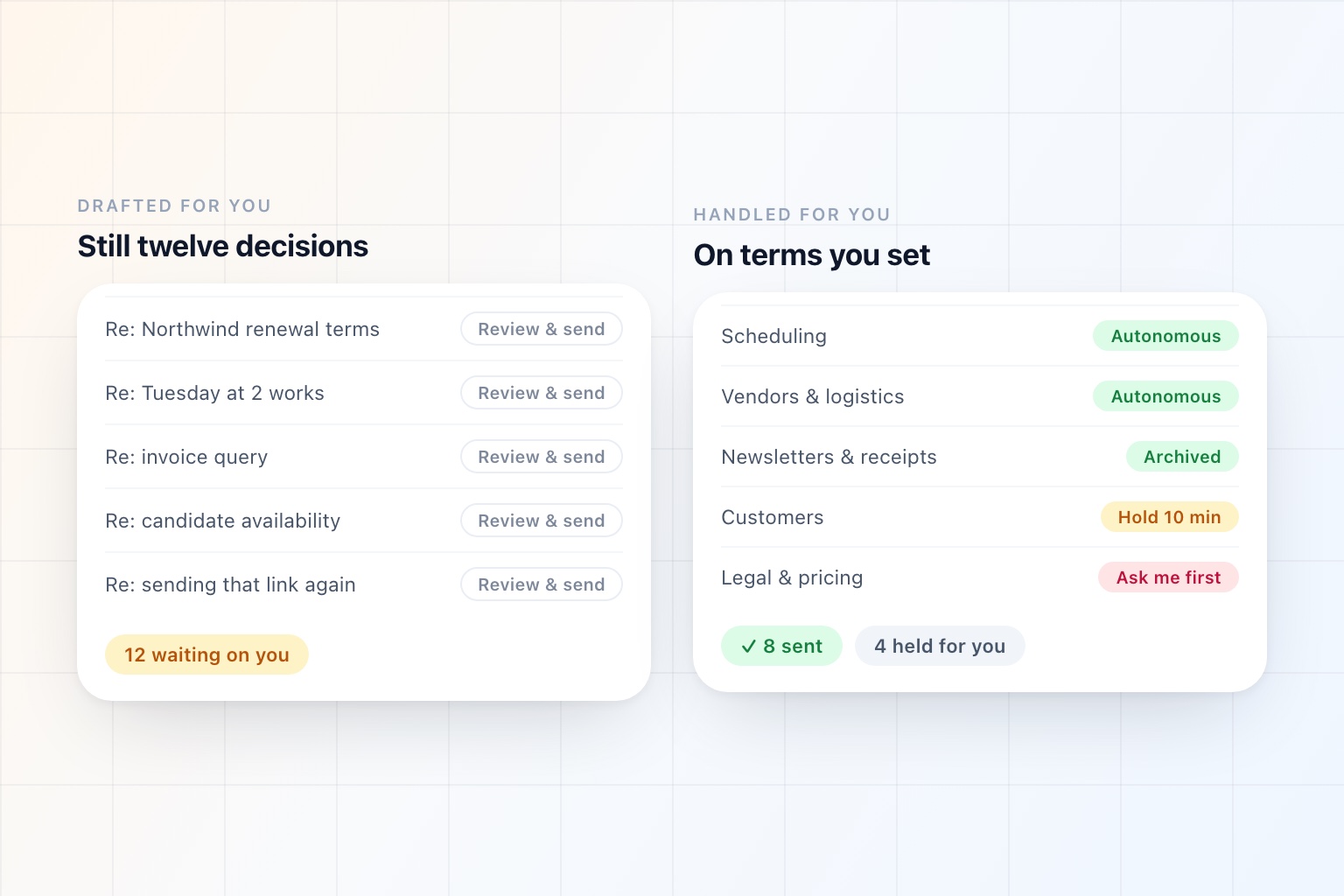
Fyxer does a specific job well. It labels what arrives and lifts the messages that matter to the top of the inbox, writes reply drafts in your voice, and takes notes on your calls with follow-ups attached — across Gmail and Outlook, without asking you to change email clients.
That last part matters more than it sounds like it should. Most good tools in this category are clients, which means a migration. Fyxer attaches to the inbox you already have, and anything you do not like about it can be switched off on a Tuesday.
People still go looking for alternatives, and in our experience it is usually one of these four.
The drafts are still a queue. Fyxer writes; it does not send. Every draft comes back to you for review, which is deliberate and reassuring and also means the number of decisions in your day has not changed. You are reading and approving instead of reading and writing. Faster, yes. Fewer, no.
The scope stops at the inbox. Email and meeting notes are covered, and it will suggest times and drop in a booking link. What it will not do is work a thread to a conclusion. The negotiation, the pre-call research, the follow-up you promised three weeks ago, the recurring Friday sweep — those stay yours, and they are usually what the inbox was generating.
The price, once it is per seat across a team. Fine for one person; a conversation at thirty.
They want to spend nothing first. A fair instinct, given both Google and Microsoft now ship drafting and summarizing in the plan you are already paying for.
Here are six alternatives, sorted by which of those is actually your reason.
Fyxer Alternatives at a Glance
| Alternative | What you get instead | The trade-off |
|---|---|---|
| OpenAssistant | It answers routine mail instead of queueing it | You have to decide what it may send unsupervised |
| Shortwave | A better place to do email, rebuilt around AI | It is a client, so it is a migration — and Gmail-centric |
| SaneBox | Sorting only, on almost any provider | No drafting at all |
| Gemini / Copilot | The AI already in your Workspace or Microsoft 365 | No triage, no memory of what you care about |
| Missive | A shared inbox a team answers together | Overkill for one person |
| Gmail or Outlook, tuned | Stay where you are and fix the settings | Costs you an afternoon and some discipline |
Capability details reflect each product's public documentation as of September 2026.
If the Review Queue Is the Problem: Act, Don't Draft
1. OpenAssistant
The distinction worth being precise about: a drafting tool changes how long a reply takes. An assistant changes whether the reply reaches you at all.
OpenAssistant is an AI email assistant that connects to Gmail or Outlook and does the same groundwork — triages what arrives by sender and subject, drafts in your voice, archives the newsletters and receipts, applies your labels by client or deal, and flags the threads you never answered.
Then it goes past the queue:
It answers routine mail outright, as itself or as you, for the categories you nominate. The confirmations, the acknowledgements, the "yes, Thursday works," the "here's that link again."
It tells you what is left, in a digest on your schedule — what needs you, what is waiting on someone else, what is done — plus a text or a notification when something genuinely cannot wait. Two hundred emails, one summary.
It handles what the email was actually about. "Reply to Dana and get it on the calendar" is one instruction. The scheduling thread, the brief before the call, and the follow-up afterwards are the same assistant, not three more subscriptions.
The obvious objection is the right one: letting software send mail as you is a bigger decision than letting it draft. So it is a setting rather than a default, configured per kind of work — hold everything for approval, hold a draft for ten minutes so you can step in before it goes, or hand a category over entirely. Internal scheduling can run unsupervised while anything touching a customer waits for a yes.
Choose it if: Approving twelve drafts a day does not feel meaningfully different from writing twelve replies.
Skip it if: You want every outbound message to pass under your eye, permanently and on principle. That is a legitimate position, and Fyxer is built for it.
If You Want a Better Place to Work
2. Shortwave
Fyxer sits on top of your inbox. Shortwave replaces it — an AI-native client built around Gmail, with search that answers questions across your mail and attachments rather than matching keywords, drafting that learns your voice from what you have sent, tl;dr summaries on long threads, and custom filters you write in plain English instead of assembling rule by rule.
Those plain-English filters are the most underrated feature in this category and the closest thing to Fyxer's labelling, done better.
Choose it if: You are on Gmail and you want the inbox itself to be smarter.
Skip it if: Your company runs on Outlook, or a client migration is not something you can sell internally.
3. Missive
A different problem entirely: mail that belongs to a team rather than a person. Shared inboxes with internal chat beside the thread, assignment, collaborative drafts, and AI for summarizing and composing.
Choose it if: The painful inbox is support@ or sales@, not yours.
Skip it if: It is just you.
If the Problem Is Price
4. SaneBox
The oldest idea here and still the most quietly effective. No new app, no chat box, no drafting — it learns what you actually read and moves the rest out of the way into folders you check on your own schedule, on almost any provider.
If your problem is volume rather than composition, this solves most of it without changing anything else about how you work.
Choose it if: You want the sorting half of Fyxer and never used the drafts.
Skip it if: Writing was the part you wanted help with.
5. Gemini in Gmail or Copilot in Outlook
You may already be paying for this. Thread summaries, drafting help, and question-style search are built into the eligible Workspace and Microsoft 365 plans, with no procurement, no security review, and no rollout.
They do not triage, do not act, and do not remember what you care about from week to week — so they are a floor rather than a replacement. But if cost is why you are reading this, the free option in your own suite deserves an honest fortnight before you buy anything else.
Choose it if: Budget is the constraint and your suite already includes it.
Skip it if: You have tried it and the inbox is unchanged.
6. Gmail or Outlook, Properly Tuned
The unglamorous answer nobody writes a listicle about. Multiple inboxes or focused inbox, aggressive filters, unsubscribe properly, templates for the five replies you send constantly, keyboard shortcuts on, notifications off.
An afternoon of work, and it closes maybe half the gap to a paid tool. It also tells you something useful: if tuning the client fixes it, you did not need a tool.
Choose it if: You have never actually configured the software you use eight hours a day.
Skip it if: You already did, and that is why you are here.
The Question Behind the Question
Fyxer's design assumption is that you want to review everything. It is a reasonable assumption, it is what most buyers say they want in a demo, and it is why the product is easy to introduce to a nervous team.
It is worth testing against your own behaviour after a month.
Open your drafts and ask how many you edited before sending. Not skimmed — edited. If the number is high, reviewing is real work and you should keep doing it, and Fyxer is a good tool for exactly that.
If the number is close to zero, you are not reviewing. You are clicking send on things you already trust, which is a permission decision dressed up as a workflow step — and it is costing you the same attention every single time.
That is the entire argument for an autonomy setting rather than a fixed policy. Not "let the AI send your email," which nobody should agree to on day one, but "let it send the kinds of mail you have already stopped reading, and keep holding the rest."
A Note on What You Keep
One practical advantage worth protecting, whichever way you go.
Fyxer, SaneBox, and an assistant all attach to the inbox you already have. Gmail stays Gmail, Outlook stays Outlook, and switching off the tool leaves everything where you left it. Clients — Shortwave included — do not have that property. If it does not work out you migrate twice.
For a team evaluation in particular, that reversibility matters more than any row on a feature table.
For the full landscape rather than just the alternatives, we compared the whole category in 7 Best AI Email Assistants for 2026, and argued that the metric everyone optimises is the wrong one in AI Email Management: Inbox Zero Was Never the Point.
Frequently Asked Questions
What is the best alternative to Fyxer AI?
It depends on which limit you hit. If the review queue is the problem — every draft still comes back to you — the alternative is an assistant that can answer routine mail outright under settings you control. If you want a smarter inbox rather than a layer on top of it, Shortwave is the AI-native Gmail client. If you only ever used the sorting, SaneBox does that one thing and nothing else.
Does Fyxer send emails automatically?
No. Fyxer drafts replies and leaves them for you to review and send. That is a deliberate design choice and the reason it is easy to introduce to a cautious team, but it also means the number of decisions in your day is unchanged — you are reading and approving rather than reading and writing.
Is there a free alternative to Fyxer?
If you are on Google Workspace or Microsoft 365, you already have some of it: Gemini in Gmail and Copilot in Outlook both summarize threads and draft replies on eligible plans. Neither triages your inbox or remembers what you care about across weeks, so they are a floor rather than a replacement — but they cost nothing extra and need no procurement.
Does Fyxer work with Outlook?
Yes — Fyxer supports both Gmail and Outlook, which narrows the field considerably, since several of the strongest tools in this category are Gmail-only. If you are evaluating alternatives and your company runs on Microsoft 365, that is the first filter to apply.
Should I let an AI assistant send email on my behalf?
Not on day one, and not for everything. The control worth looking for is granularity: which kinds of mail it may answer on its own, which get drafted and held, how long it waits before sending so you can step in, and what always escalates. Most people start with everything held for approval and hand over the categories they had already stopped reading carefully.
See it in the product
Past the draft queue, on your terms
Works with the Gmail or Outlook you already have. You decide, per kind of mail, what it sends and what waits for you.
Free plan · No credit card required