Reclaim.ai Alternatives: 7 AI Calendar Tools Compared for 2026
 Justin Canetti10 min read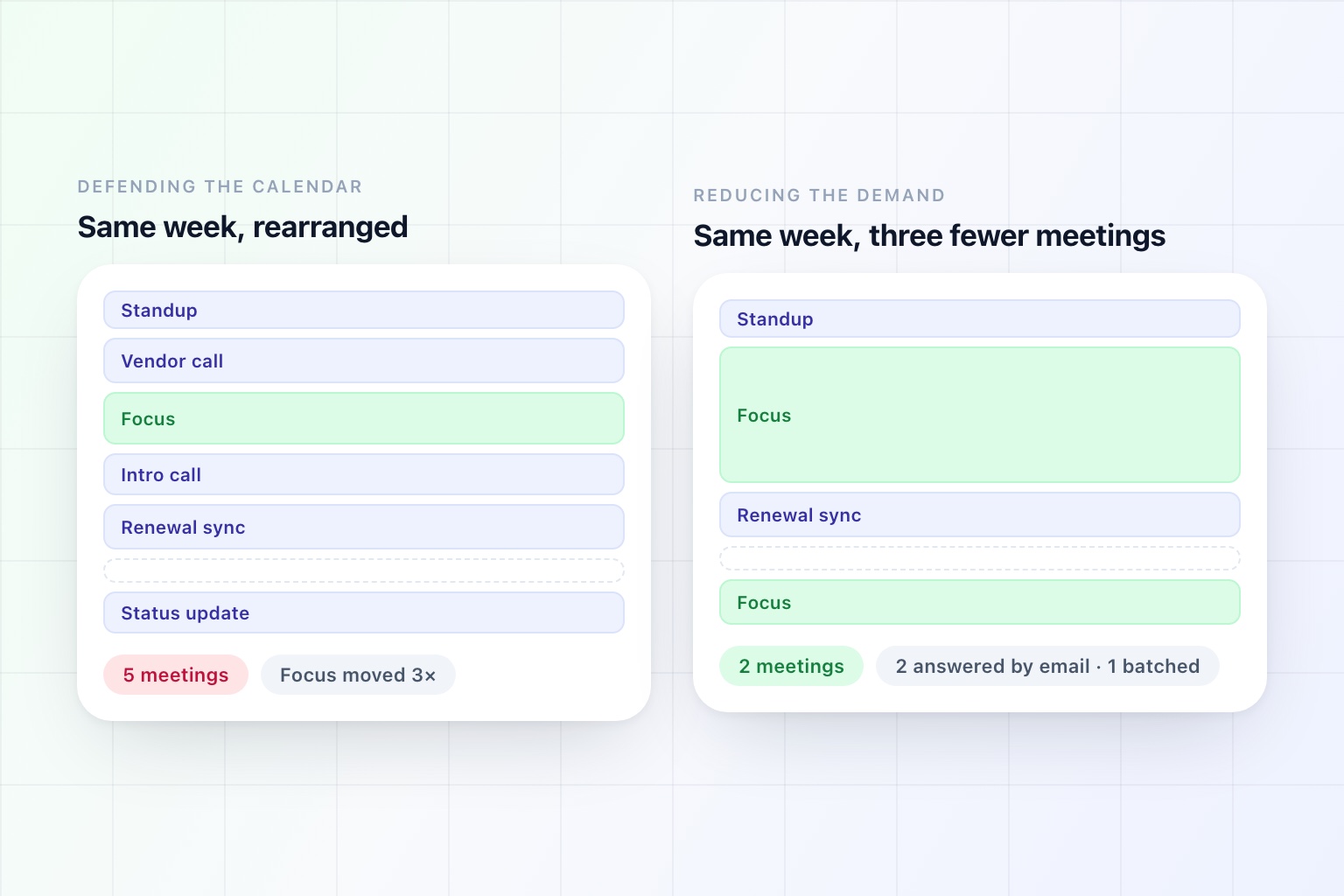
Reclaim is a good product with a clear idea behind it. It treats your calendar as something to be actively managed rather than passively filled: it finds room for your habits, places your tasks in the gaps, defends focus blocks, adds buffers and travel time, moves your flexible one-on-ones when the week changes, and keeps doing it as things shift.
If your working week is a Tetris problem, that is the tool for it.
People go looking for alternatives for four reasons, and they point at very different products.
It rearranges, but it does not reduce. Reclaim is excellent at finding you two hours on Thursday. It has no opinion at all about whether the meetings it worked around should have existed. For a lot of people that is the actual problem, and no amount of rearranging touches it.
What they wanted was task management. Plenty of Reclaim users are really trying to make their to-do list happen. That is adjacent, and there are tools built specifically for it.
They wanted to plan, not to be planned for. Automatic scheduling means your calendar changes while you are not looking. Some people find that liberating and some find it unsettling, and the second group tends to want a ritual rather than an algorithm.
They came from Clockwise. Worth saying plainly if you are reading older comparisons: Salesforce acquired the Clockwise team in March 2026 and the product was sunset days later. It is not a tool you can sign up for. If a 2025 article sent you here, that is why.
Here are seven alternatives, grouped by which of those reasons is yours.
Reclaim Alternatives at a Glance
| Tool | How it works | Best for |
|---|---|---|
| OpenAssistant | Handles the requests before they become meetings | Calendars full of other people's meetings and the admin around them |
| Skej | Runs the scheduling thread over email | External meeting volume, without the broader assistant |
| Motion | Schedules your task list into the gaps | People who plan in tasks and want the calendar built from them |
| Sunsama | A daily planning ritual you do yourself | Deliberate planning over automatic rearranging |
| Akiflow | Consolidates tasks from every tool, then time-blocks them | Work scattered across Jira, Asana, Slack, and email |
| Morgen | One control surface over several calendars | Multiple accounts and providers in one view |
| Built-in focus time | Already in Google Calendar and Outlook | Spending nothing before you decide you need a tool |
Capability details reflect each product's public documentation as of September 2026.
First, the Question That Sorts This List
Before comparing features, work out which of these two sentences describes your week:
"I have enough time, it is just in the wrong shape." Your meetings are mostly necessary, but they are scattered, and the gaps between them are too small to do anything with. This is a packing problem, and Reclaim is genuinely one of the best answers to it. Motion, Sunsama, and Akiflow are the other answers.
"I do not have enough time, because too much lands on me." External meetings you did not need to attend, threads that became calls, coordination you are doing yourself, and admin that eats the gaps you did protect. This is a demand problem, and rearranging blocks cannot fix it — the calendar tool is dutifully optimising around work that should never have reached you.
Most people saying "my calendar is a mess" mean the second thing and buy a tool for the first. That is the mismatch this list exists to sort out.
1. OpenAssistant — Best if the Calendar Is Full of Other People's Meetings
This is the alternative for the demand problem, and it is fair to say up front that it is a different category rather than a like-for-like swap.
OpenAssistant does not auto-place your habits or defragment your week. What it does, as an AI scheduling assistant, is intercept the work that fills the week in the first place.
Scheduling happens without you. Cc it on a thread and it reads the request, checks your calendar, proposes times that respect your working hours and buffers, handles the replies, chases whoever goes quiet, and sends the invite. The half-hour a day you spend arranging meetings stops being yours — and so does the meeting that gets booked at 8am because you were not paying attention.
Some meetings stop being meetings. A lot of calls exist because answering properly in writing was too much effort. When an assistant can research the question, draft the reply, and follow up on it, the "quick sync" often does not get proposed.
The admin around the meetings goes too. Pre-call briefs, the follow-ups you promised, inbox triage, the recurring Friday sweep. That is the work that eats the focus block Reclaim so carefully protected for you.
You set what it does unsupervised, per kind of work — hold everything for approval, hold a draft for ten minutes so you can step in, or hand a category over entirely.
Best for: People whose calendars are dense with external meetings, coordination, and admin rather than with their own tasks.
Worth knowing: It will not place your gym sessions or rebuild your week around a deadline. If you want automatic time blocking, you want Reclaim or Motion, and running one of those alongside an assistant is a perfectly sensible setup.
2. Skej — Best if the Scheduling Itself Is the Problem
Reclaim does not negotiate by email. It will hand someone a booking link, but it will not work the thread on your behalf. That is the boundary, and Skej is the tool that sits on the other side of it.
You add Skej to an email thread and it checks calendars, proposes times, talks to the attendees, handles the replies, reschedules when plans change, and books the meeting — the negotiation that produced the block Reclaim is now busy defending. It supports booking links too, for the cases where self-service genuinely is better.
It is worth pairing that with the sorting question above. If your week is dense because arranging meetings is itself a job, a scheduling assistant removes the job. If your week is dense because the meetings exist at all, this narrows the problem without removing it.
Best for: High external meeting volume, where the back-and-forth is the tax.
Worth knowing: Scheduling only. It will not place focus blocks, schedule your tasks, or defend your week — so it solves a different half of the problem than Reclaim, and plenty of people run both.
3. Motion — Best for Task-Driven Calendars
The most direct competitor, and the most ambitious. Motion combines a task manager with an AI calendar: you add a task with a duration and a deadline, and it finds the slot, then continuously rebuilds your day as meetings and priorities change.
Where Reclaim starts from your calendar and protects it, Motion starts from your work and schedules it. If your recurring complaint is that the actual work never gets a time slot, that difference matters.
It asks more of your budget than a calendar tool usually does, which is defensible given it is replacing a task manager as well.
Best for: People who live in a task list and want the calendar generated from it.
Worth knowing: Handing your whole day to an algorithm is a commitment. Trialling it during a quiet week tells you very little.
4. Sunsama — Best for Planning Deliberately
Sunsama is the philosophical opposite of everything else here, and it is on this list because a surprising number of ex-Reclaim users end up there.
Rather than automating your day, it walks you through planning it: pull tasks in from your other tools, decide what actually fits, estimate each one, and close the day with a shutdown routine. It is a ritual with software attached.
The argument is that automation removes the one useful part of planning, which is being forced to admit that eleven things will not fit into six hours. Sunsama makes you confront that every morning.
Best for: People who want intention rather than optimisation, and who will actually do a ten-minute daily ritual.
Worth knowing: It requires that ritual. Skip it for three days and the tool does nothing for you.
5. Akiflow — Best for Work Scattered Across Tools
Akiflow's premise is consolidation. It pulls tasks in from everywhere they accumulate — Jira, Asana, Notion, Slack, email — into a single inbox, and then you drag them onto the calendar as time blocks.
If your real problem is that you do not have one list, and the calendar is only failing because the work is spread across nine places, this is aimed precisely at you.
Best for: People drowning in task sources rather than in meetings.
Worth knowing: The time-blocking is largely manual. It is a consolidator with a calendar, not an auto-scheduler.
6. Morgen — Best for Multiple Calendars and Providers
Morgen is the power-user option: one surface over several calendars across different accounts and providers, with task integrations, scheduling links, and a lot of control over how it all behaves.
It is the right answer for a specific and common situation — two work accounts, a personal calendar, and a contractor account, none of which can see each other — where the problem is visibility before it is optimisation.
Best for: Anyone whose life is split across calendars that do not talk to each other.
Worth knowing: More control means more configuration. It rewards people who enjoy that.
7. Built-In Focus Time — Best Free Starting Point
Both Google Calendar and Outlook have some of this natively now: focus time entries that decline meetings, working-hours enforcement, and, on the Microsoft side, Viva Insights nudging you to book time for the work you owe.
It is cruder than anything else on this page. It is also free, already switched on, and requires no security review — and for a person with four meetings a day rather than nine, it is frequently enough.
Best for: Finding out whether you have a tool problem or a habit problem before spending money.
Worth knowing: Availability varies by Workspace and Microsoft 365 edition.
Which One Should You Choose?
- Your meetings are necessary but badly arranged: stay on Reclaim
- Arranging the meetings is itself the job: Skej
- Your to-do list never gets a slot: Motion
- You want to plan your own day, properly, once a day: Sunsama
- Your work is scattered across six tools: Akiflow
- Your calendars do not talk to each other: Morgen
- You have not tried the free option yet: Google or Outlook focus time
- Too much is landing on you in the first place: OpenAssistant
The last one is the only entry on this list that changes the number of meetings rather than their position. Everything else, including Reclaim, is a packing algorithm — very good ones, solving a real problem, but a packing algorithm nonetheless.
The Limit of Defending Your Calendar
There is a ceiling on this whole category, and it is worth naming.
A tool that protects focus time is negotiating with your calendar on your behalf. It is not negotiating with the people filling it. When a colleague books over your focus block because they genuinely need you, the tool moves the block; it does not ask whether the meeting was necessary. Defended time is time that survived, which is not the same as time you have.
That is not a flaw in Reclaim. It is the boundary of what a calendar-native tool can see. Your calendar does not contain the email thread that turned into a call, the question that could have been answered in writing, or the follow-up you agreed to and forgot.
The tools that can act on those things are working one layer up — on the correspondence, not the blocks. We made that argument at length in AI Scheduling Assistants: Scheduling Was Never a Calendar Problem, and compared the booking-link end of the market in 8 Best Calendly Alternatives for 2026.
The Honest Recommendation
If you are on Reclaim and it is working, stay. It is a well-built product in a category that is now thinner than it was — Clockwise is gone, and the remaining serious options are Motion and a handful of tools that solve adjacent problems.
If you are leaving because your week still feels impossible after the algorithm has done its best, the useful thing to notice is that you may not have a calendar problem at all. You have a volume problem that has been showing up on the calendar, which is simply where it becomes visible.
No amount of rearranging fixes that. Something has to take work off you.
Frequently Asked Questions
What is the best alternative to Reclaim.ai?
It depends which job you are replacing. Motion is the closest competitor if you want your task list scheduled as well as your focus time protected. Sunsama is the pick if you would rather plan deliberately than be planned for. If your calendar is full of other people's meetings rather than your own work, the useful alternative is an assistant that reduces how much lands on it rather than a tool that rearranges what is already there.
Is Clockwise still an alternative to Reclaim?
No. Salesforce acqui-hired the Clockwise team in March 2026 and the product was shut down on March 27, 2026, with customer accounts closed and data deleted. Comparison articles that still list it were written before the shutdown and have not been updated.
What is the difference between Reclaim and Motion?
Reclaim starts from your calendar and protects it — defending focus blocks, placing habits, moving flexible one-on-ones. Motion starts from your work and schedules it, taking tasks with durations and deadlines and continuously rebuilding your day around them. If the complaint is 'my focus time keeps getting eaten,' that is Reclaim. If it is 'the work never gets a slot,' that is Motion.
Does Reclaim.ai schedule meetings with people outside my company?
Through a link, yes. Reclaim has Scheduling Links and Smart Meetings, so an external guest can book a slot that Reclaim then defends. What it does not do is work your correspondence: it will not join an email thread, propose times inside it, or negotiate a slot on your behalf. That is a different category of tool — a scheduling assistant you Cc on the thread — and the two compose well together.
Is a free alternative to Reclaim worth trying first?
Often, yes. Google Calendar and Outlook both have focus time and working-hours enforcement built in, at no extra cost and with no security review. For someone with four meetings a day rather than nine it is frequently enough, and a fortnight on the built-in version tells you how much of the paid tool you were actually using.
See it in the product
Fewer meetings beats better-arranged meetings
An assistant that handles the scheduling, the prep, and the follow-ups, so there is less to fit into the week in the first place.
Free plan · No credit card required