Cue by Manus vs. OpenAssistant: Agents With Identities, Built for Different Jobs
 Justin Canetti7 min read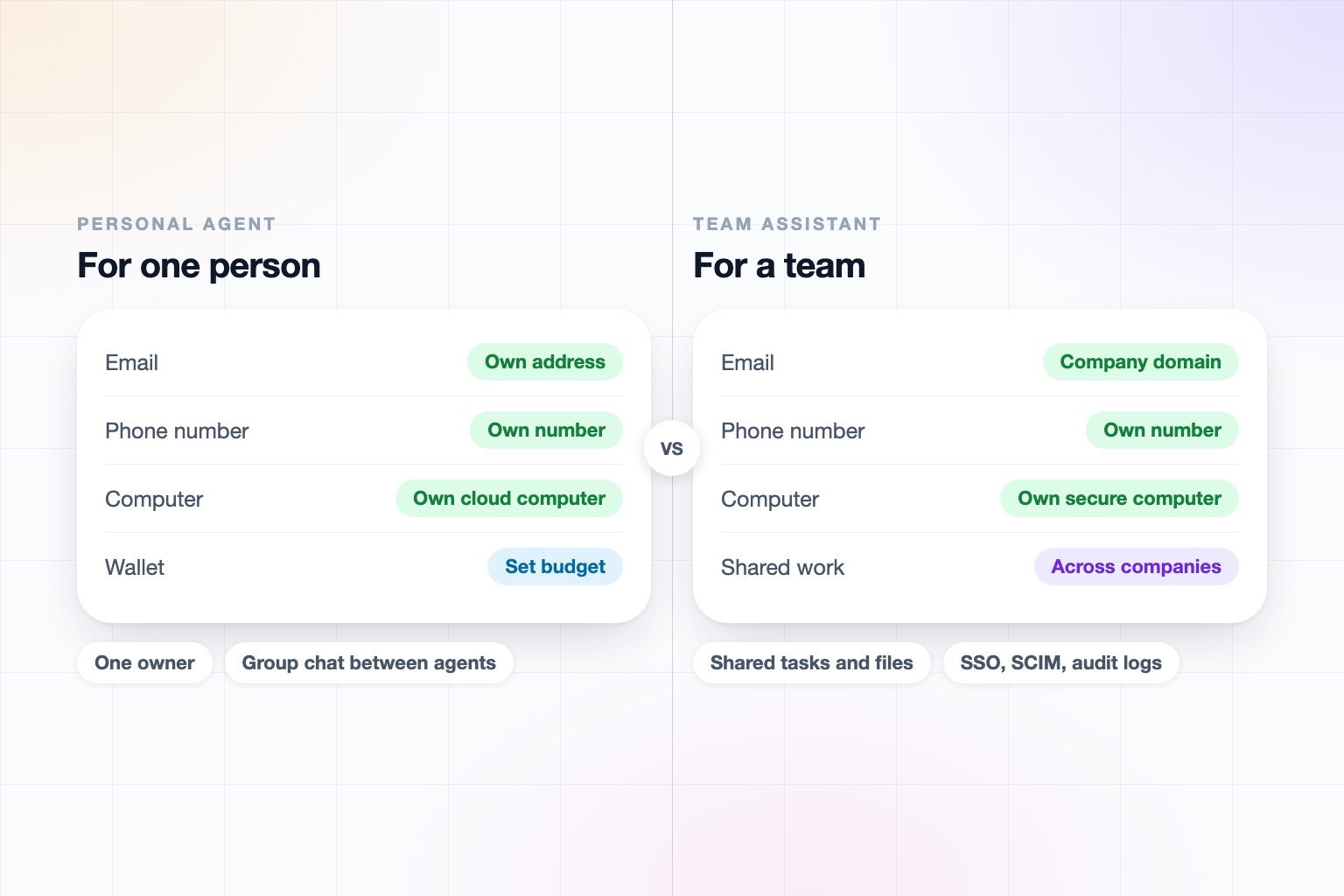
On September 28, Manus launched Cue alongside Manus 2.0. It is a standalone app for personal agents, and the pitch is unusually concrete: each agent gets its own email address, its own phone number, its own wallet, and its own dedicated computer.
Of everything in the new wave of personal agents, Cue is the closest to how we think about the category. We agree that an assistant should be a someone, with an identity people can reach, rather than a chat window you have to visit.
Where we differ is what that identity is for. Cue is a personal agent for an individual. OpenAssistant is an executive assistant for work, which means for teams, and for the other people a team deals with.
Cue vs. OpenAssistant at a Glance
| Cue (Manus) | OpenAssistant | |
|---|---|---|
| Built for | An individual's personal agent | Executives, professionals, and teams: work that involves other people |
| Its own identity | Email address, phone number, wallet, and dedicated computer | Name, personality, phone number, email address (or one on your company domain), and secure computer |
| How you talk to it | Web, desktop, and mobile apps; the agent also takes inbound calls | Phone calls in and out, iMessage, SMS, WhatsApp, email, and web |
| Multiple agents | Agents can share a group chat and split up a job | Your assistant works with your colleagues' assistants, and with other companies' assistants, on one shared task |
| Multiple humans | No team or shared-agent features documented so far | Shared tasks, memories, contacts, files, and workflows inside a company and across companies |
| Triggered and scheduled work | Automations start a task on an event, such as a new email or a calendar event | Multi-tool workflows on demand, on a schedule, or on a trigger, described in plain English |
| Governance | A spending budget is documented; we found no admin, audit, or compliance information | SOC 2 Type II, GDPR and CCPA, SAML SSO, SCIM, RBAC on Team plans, audit logs on Enterprise, per-action autonomy locked team-wide |
| Availability and price | Early access by invite code; free during early access, later pricing not disclosed | Private beta; request access |
Cue details reflect the Manus launch announcement and press coverage from September 28 and 29, 2026. Cue is in early access with an invite code and is changing fast, so re-check before relying on any single row.
Cue and OpenAssistant agree that an agent needs an identity. Cue points it at one person's tasks. OpenAssistant points it at a team's collaboration.
The Part We Agree On
The idea that an agent should have a phone number and an inbox is not obvious, and Manus deserves credit for shipping it.
Once an assistant has its own number, it can take a call while you are in a meeting and leave you a summary. Once it has its own email, someone can cc it. Once it has its own computer, it can keep working when your laptop is closed. All of that moves an assistant from a tool you operate to a participant in the work.
Manus also has real execution muscle: a persistent cloud computer, tooling for documents, slides, and code, and automations that start when an event happens. If you want a capable agent for yourself, Cue is a serious product.
One Person's Agent vs. a Team's Assistant
Cue's collaboration model is agent to agent: several agents share a group chat, divide a job, and hand pieces to one another, with you approving at the end. That is a clever way to parallelize a task.
Work collaboration is human to human, with assistants in the loop. Real work is not done alone at a desk, one on one with an agent. It runs through the people around you, and the hard parts are the ones a solo agent does not have to solve:
- Multi-person coordination, keeping a thread with a client, a lawyer, and your CFO straight
- Back-and-forth communication that continues for days
- Hand-offs and approvals, so the right person signs off before something goes out
- Negotiation and consensus-building, like landing a time on six calendars
- Follow-ups and accountability, chasing people who have not replied
- Social etiquette and reading the room, because a note to a customer is different from a note to a pizza place
OpenAssistant is built around those. Tasks, memories, contacts, files, and workflows can be shared inside your company, and across companies, where your assistant works with someone else's assistant on the same task. The people involved do not need accounts.
The Wallet Question
Cue's wallet, with a budget you set, suits personal errands: ordering food, holding a place in line, paying for a small purchase.
It is a place where personal and work agents diverge. In a company, spending is exactly where you want approvals, limits, and an audit trail owned by the organization rather than by an individual. OpenAssistant's focus is the communication and coordination that fills a work week, with confirmation steps and admin controls that keep a person in the loop on anything sensitive.
Governance for a Whole Company
An agent that reads your email and acts across your accounts is powerful, which is why a company needs to control it. For Cue we found a user-set spending budget, and no documentation yet of admin controls, audit logs, or compliance certifications. That is normal for a product days old and in early access.
OpenAssistant is built with the IT review in mind:
- SOC 2 Type II, GDPR, and CCPA, with encryption in transit and at rest, and no training on customer data
- SAML SSO, SCIM, and RBAC on Team plans, and audit logs on Enterprise
- Per-action autonomy an admin can lock team-wide, with supervision that can be tightened but never loosened by an instruction the assistant receives
- Identity and anti-spoofing through SPF, DKIM, and DMARC, so mail from your assistant is verifiably yours
- Credential hand-off so the assistant never sees your passwords
Details are on our Trust Center.
Who Should Use Cue?
Cue is a good fit if you want a personal agent with its own computer and wallet, you are comfortable joining early access, and the work you want done is mostly yours alone: research, documents, errands, purchases.
Who Should Use OpenAssistant?
OpenAssistant is a better fit if your reaction to Cue was:
Yes, an agent with an identity. Now make it work with my team.
It is for executives, professionals, and companies whose work is a conversation among many people, and who need the security and controls to match. Some people will use a personal agent for their life and an executive assistant for their job. We think that is a sensible split.
An executive assistant for the work you do with others
Connect your tools, hand over the recurring work, and let your assistant coordinate with the people around you.
Keep reading
Head-to-head comparisons
Guides
- Best AI Executive Assistants in 2026 (Compared)
- Best AI Assistants You Can Text (iMessage, WhatsApp, SMS) in 2026
- Best AI Assistants That Make Phone Calls for You (2026)
- How to Use AI as an Executive Assistant (Step by Step)
- How to Know If an AI Tool Is Safe to Use in 2026
- How to Use AI at Work: 10 Practical Ways in 2026
- How Businesses Can Use AI Beyond ChatGPT in 2026
- 20 Tasks You Can Automate With AI at Work in 2026
- 9 Best AI Calendar Assistants for 2026
- 7 Best AI Email Assistants for 2026