Grok Bot vs. OpenAssistant: Your Accounts or Its Own Identity?
 Justin Canetti7 min read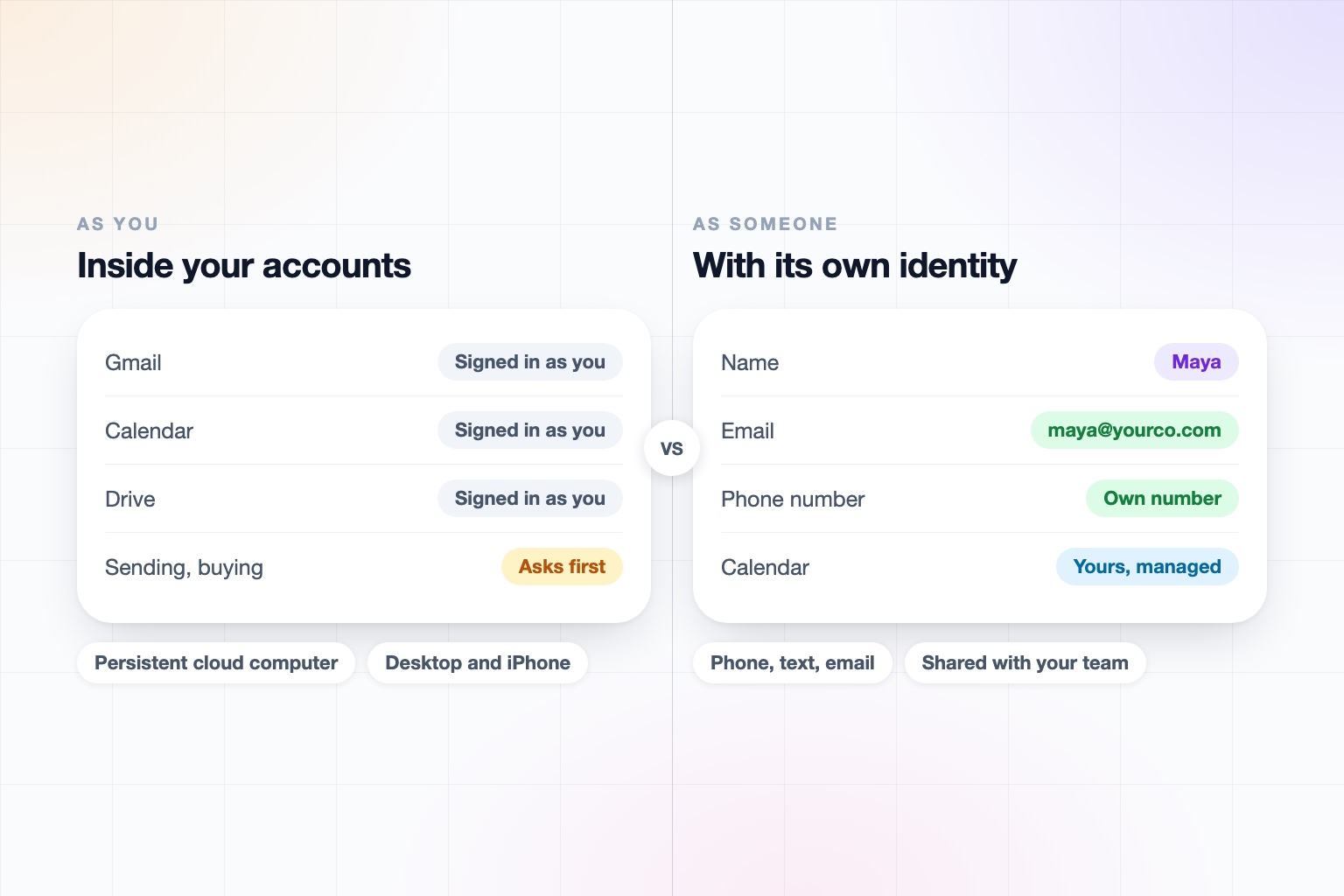
xAI launched Grok Bot in beta on August 11. It is a persistent, named agent that runs on its own cloud computer with a browser, a file system, a terminal, and tool connections, signs into your apps, and keeps working when your laptop is closed.
A note on naming, because it is confusing: Grok Bot is separate from @grok, the chatbot that replies on X, and from Grok Business and Enterprise, xAI's team plans. This post is about the agent.
It is an interesting product. It can learn a skill from a short demonstration in the browser, run several bots in parallel, and work through software that has no API. It also answers an important question differently from us: does an agent work as you, or as someone?
Grok Bot vs. OpenAssistant at a Glance
| Grok Bot | OpenAssistant | |
|---|---|---|
| What it is | A persistent agent on a cloud computer with a browser, terminal, and tool connections | An executive assistant with a name, personality, and its own secure computer |
| How you reach it | Desktop and mobile apps; no email or phone reach documented | Phone calls in and out, iMessage, SMS, WhatsApp, email, and web |
| Its own phone number and email | None documented; it works inside your logins | Yes: its own phone number and email address (or one on your company domain) |
| Acting for you | Through your own accounts, with approval for sending, publishing, buying, and deleting | As your assistant, in its own name, with confirmation steps for sensitive actions |
| Working with other people | Several bots can coordinate in group chat; we found no multi-user features documented | Shared tasks, memories, contacts, files, and workflows, inside your company and across companies, with assistants working with each other |
| Recurring and triggered work | Routines on a schedule or on events, up to 50 per bot | Multi-tool workflows on demand, on a schedule, or on a trigger, described in plain English |
| Security and admin | Bots share one machine and are not separate security boundaries; enterprise controls are described for the team plans | SOC 2 Type II, GDPR and CCPA, SAML SSO, SCIM, and RBAC on Team plans, audit logs on Enterprise, no training on customer data |
| Availability | Beta, through SuperGrok Heavy or Cursor plans; prices vary by source | Private beta; request access |
Grok Bot details reflect xAI's documentation and press and analyst coverage as of September 2026. Grok Bot is in beta and its pricing and access details are changing, so confirm on xAI's site before relying on any single row.
Grok Bot is an agent that operates inside your accounts. OpenAssistant is an assistant with its own identity that works with the people around you.
What Grok Bot Does Well
- It works through anything. With a browser and a computer-use fallback, it can operate software that has no connector or API.
- Skills by demonstration. Show it a task in the browser for a few minutes and it can repeat it.
- Parallel bots. Multiple agents can run at once and coordinate in group chat.
- Routines. Scheduled and event-driven runs, with the history of recent runs kept.
- Real-time context. xAI's edge in live information from X and the web is a genuine advantage for research and monitoring.
- Sensible approvals. It asks before sending, publishing, buying, or deleting, and stops for passwords and two-factor prompts.
If you are a technical user who wants a persistent agent running your accounts, particularly one that can work with legacy software, it is worth a try.
Working As You vs. Working As Someone
Grok Bot acts inside your logins. When it sends an email, it is your email. That is simple, and it means nobody outside needs to know it exists.
It also means it cannot be reached on its own. Colleagues cannot text it or cc it, and a vendor cannot call it. It has no separate presence, so it is useful to you and invisible to everyone else.
An OpenAssistant assistant is a someone. It has its own name, personality, phone number, email address (or one on your company domain), and its own secure computer, and it manages your calendar. People can reach it directly, and it can reach them. You decide how human it seems, disclosure included.
Work Is Made of People
Grok Bot's group chat is for coordinating between bots. Work is coordination between humans, with assistants in the loop.
Real work is not done alone at a desk, one on one with an agent. It runs through other people, and doing it well takes six things that a solo agent does not need:
- Multi-person coordination, holding one thread across many people
- Back-and-forth communication that continues for days
- Hand-offs and approvals, so the right person signs off before anything goes out
- Negotiation and consensus-building, like finding a time that works for six calendars
- Follow-ups and accountability, chasing the people who have not replied
- Social etiquette and reading the room, because your assistant is speaking for you
That is what OpenAssistant is built for. Tasks, memories, contacts, files, and workflows can be shared inside a company and across companies, where your assistant works with someone else's assistant on one shared task. The people involved do not need accounts.
Governance for a Team
Per xAI's docs and third-party reviews, Grok Bot's bots share one machine and are not separate security boundaries, so you would want to think carefully before giving several people's work to one. xAI's Business and Enterprise plans describe enterprise controls such as SSO and SCIM, and those are worth evaluating, though we found the agent's own team story still taking shape during the beta.
OpenAssistant is built with the IT review in mind:
- SOC 2 Type II, GDPR, and CCPA, with encryption in transit and at rest, and no training on customer data
- SAML SSO, SCIM, and RBAC on Team plans, and audit logs on Enterprise
- Per-action autonomy an admin can lock team-wide, with supervision that can be tightened but never loosened by any instruction the assistant receives
- Identity and anti-spoofing through SPF, DKIM, and DMARC
- Credential hand-off, so the assistant never sees your passwords
Details are on our Trust Center and pricing page.
Who Should Use Which?
Grok Bot is a good fit if you are technical, you want a persistent agent working in your own accounts, and you would like to try what a browser-driving agent can do with the software you already have.
OpenAssistant is a better fit if your reaction to Grok Bot was:
That would be great for me. How do I get one for my team, and for the people we work with?
It is for professionals and companies whose work is a conversation among many people. And the two can sit side by side: a persistent bot for the grunt work inside your tools, and an executive assistant for everything that involves someone else.
An executive assistant for the work you do with others
Connect your tools, hand over the recurring work, and let your assistant coordinate with the people around you.
Keep reading
Head-to-head comparisons
- Grok Bot Pricing (2026): What It Costs and Which Plan You Need
- Grok Bot vs ChatGPT for Work (2026): Which Is Better?
- Best AI Personal Assistants and Agents in 2026, Compared
- Meta Muse vs Grok Bot (2026): Which AI Agent Is Better?
- Grok Bot vs Cue by Manus (2026): Which AI Agent Wins?
- Instinct vs Grok Bot (2026): Which AI Agent Is Better?
- Claude Cowork vs Grok Bot (2026): Which Agent Is Better?
Guides
- Best AI Executive Assistants in 2026 (Compared)
- Best AI Assistants You Can Text (iMessage, WhatsApp, SMS) in 2026
- Best AI Assistants That Make Phone Calls for You (2026)
- How to Use AI as an Executive Assistant (Step by Step)
- How to Know If an AI Tool Is Safe to Use in 2026
- How to Use AI at Work: 10 Practical Ways in 2026
- How Businesses Can Use AI Beyond ChatGPT in 2026
- 20 Tasks You Can Automate With AI at Work in 2026
- 9 Best AI Calendar Assistants for 2026
- 7 Best AI Email Assistants for 2026